

- ITSM
- Atlassian
- AI
Related guides
Guide
Service Management Explained:
Understanding ITSM & ESM
A complete guide to IT Service Management (ITSM) and Enterprise Service Management (ESM). Learn key concepts, best practices, and tools for success.
1. Why service management?
Businesses are locked in a high-stakes competition for efficiency, with streamlining operations and improving service delivery across departments being top priorities that service management can help with. By reusing proven IT Service Management (ITSM) practices and extending them to the whole organization through Enterprise Service Management (ESM), you can provide improved efficiency, productivity, and excellent service delivery across the board.
Service management can help you tackle a number of challenges, including:
Too much documentation to work with
Silos forming in your organization
Administrative overload
Inconsistent service delivery
Lack of visibility
Slow response times
In this guide, we’ll explore the latest ITSM and ESM trends and their benefits for various departments to help you transform your organization into a well-oiled machine.
For easy reading, receive this guide as a PDF by e-mail
2. ITSM & ESM explained

Service management is a set of specialized organizational capabilities for customer service delivery. ITIL4 takes a comprehensive approach to service management, focusing on co-creating value through collaboration, continual improvement, and seamless integration of various service management practices. In short, service management is the overarching set of practices around services, whereas ITSM and ESM are specific implementations.

ITSM refers to an organization's activities to design, plan, deliver, operate, and control information technology (IT) services offered to customers. ITSM aims to ensure that IT services align with business needs and provide value to customers.

ESM extends ITSM principles across the entire organization, not just within IT. It aims to improve efficiency, productivity, and service delivery by using a unified platform to manage and automate workflows and service requests across various departments. This approach helps break down silos, fostering better collaboration and communication.
Service management is a key discipline that focuses on designing, delivering, managing, and improving an organization's services to its customers. It includes various processes and practices to ensure services meet the business’ and clients' needs.
Those who benefit from service management include:
Customers and clients: Effective service management ensures their needs and expectations are met, increasing customer satisfaction and loyalty.
Service providers: Service management helps them plan, design, deliver, operate, and improve services to meet business goals.
Employees and staff: Internal employees benefit from streamlined processes and clear guidelines on service delivery.
Business leaders and managers: They use service management to align IT and other service functions with business objectives, ensuring resources are used effectively and goals are met.
IT and technical teams: These teams implement and manage the technological aspects of service delivery, using frameworks like ITIL to standardize processes and improve service quality.
Stakeholders and partners: Good service management ensures that all parties clearly understand roles, responsibilities, and expectations.
Service management is for anyone who provides, uses, or oversees organizational services. It aims to create value for all stakeholders by ensuring services are delivered efficiently and effectively to align with business needs.
3. Why ESM matters
Enterprise Service Management addresses several key challenges organizations face:

By breaking down silos, ESM fosters cooperation among different departments, leading to more cohesive service delivery.

By automating routine tasks, ESM reduces administrative burdens, allowing teams to focus on higher-value activities.

Simplified processes are a core feature of ESM platforms, making it easier for teams to manage requests and resolve issues.

ensuring non-technical staff can navigate and utilize the systems effectively.
Enterprise Service Management reflects a shift in how organizations view service management, as the principles of ITSM are no longer confined to IT. Forrester defines ESM as extending ITSM platform capabilities beyond technology services to address business-centric use cases.

Implementing a single platform to manage all service requests and workflows reduces complexity and improves visibility.

Promoting better communication and cooperation between departments, breaking down silos.

Automating routine tasks and processes, allowing teams to focus on higher-value activities.

Standardized processes and best practices lead to consistent, high-quality service delivery.
4. Use cases
Here’s a detailed breakdown of how different departments can use ESM, along with the specific use cases and benefits they can expect:
| Department | Use case | Benefits |
| Administration | Managing general administrative tasks, scheduling meetings, and handling office supplies. | Improved administrative efficiency, better resource management, and enhanced office productivity. |
| Customer Service | Managing customer inquiries, support tickets, and service requests. | Enhanced customer experience, faster resolution of issues, and better service quality. |
| Development | Managing software development projects, tracking bugs and feature requests, and coordinating development tasks. | Improved project tracking, better collaboration among development teams, and enhanced product quality and delivery timelines. |
| Education and training | Coordinating training sessions, managing course enrollments, and tracking employee certifications. | More efficient training program management, better employee development tracking, and improved skill development. |
| Facilities management | Handling maintenance requests, space management, and equipment tracking. | Better management of resources, quicker response to requests, and enhanced operational efficiency. |
| Finance | Managing expense approvals, tracking financial assets, and handling vendor inquiries. | Improved accuracy, faster processing of requests, and better financial oversight. |
| Human Resources (HR) | Managing onboarding processes, leave requests, and employee inquiries. | Streamlined processes, reduced administrative burden, and improved employee satisfaction. |
| Information Technology (IT) | Managing IT support tickets, incident responses, change requests, and asset management. | Improved incident resolution times, better asset tracking, and IT service delivery. |
| Legal | Managing legal inquiries, contract reviews, and compliance requests. | Streamlined handling of legal documents, improved compliance tracking, and reduced legal risk. |
| Marketing | Coordinating marketing campaigns, handling creative requests, and managing content approvals. | Better coordination of marketing activities, faster turnaround on creative requests, and more effective campaign management. |
| Operations | Overseeing daily operational tasks, managing process workflows, and handling operational inquiries. | Enhanced operational efficiency, streamlined process management, and improved oversight of day-to-day activities. |
| Procurement | Managing purchase orders, supplier inquiries, and contract negotiations. | Streamlined procurement processes, improved supplier management, and better tracking of purchasing activities. |
| Research and Development (R&D) | Managing project requests, coordinating research activities, and tracking development milestones. | Enhanced project management, better tracking of R&D activities, and improved innovation outcomes. |
| Sales | Managing sales inquiries, processing orders, and handling customer follow-ups. | Improved sales process efficiency, faster order processing, and enhanced customer relationships. |
| Senior Management | Overseeing strategic initiatives, managing executive-level projects, and handling high-level inquiries and decisions. | Better visibility into organizational performance, improved decision-making processes, and enhanced alignment of strategic goals with operational execution. |
| Supply Chain Management | Managing logistics, tracking shipments, and coordinating supply chain activities. | Better visibility into supply chain operations, improved logistics management, and enhanced coordination of supply chain activities. |
Using ITSM tools for ESM often creates challenges for non-IT departments. They can sometimes be too complex and confusing, leading to poor adoption and inefficiencies. Additionally, customizing ITSM tools for other departments is time- consuming and costly, and the IT-centric design may frustrate users and reduce productivity. Maintaining these tools across departments also requires significant resources, distracting users from other priorities.
Organizations should adopt user- friendly tools for non-IT departments to overcome these challenges. Efficient customization options are essential to fit departmental needs without extensive effort, so it’s crucial to implement tools that include only the necessary functions for each department.
Streamlining maintenance with solutions that integrate seamlessly with existing systems and are easy to maintain can ease resource burdens. Providing comprehensive training and support also enhances user proficiency and satisfaction, with a phased implementation approach allowing for adjustments based on feedback.
Finding an ESM solution that’s part of your ITSM platform and allows close collaboration with development teams adds significant value. By keeping your users on the same platform for all delivery uses, you reduce the need to integrate various tools, which can increase the total cost of ownership.
These strategies help overcome challenges, enabling efficient and
effective service management across all departments while maximizing
value and minimizing costs.
These strategies help overcome challenges, enabling efficient and
effective service management across all departments while maximizing
value and minimizing costs.For easy reading, receive this guide as a PDF by e-mail
5. Implementing ESM
To overcome the limits of traditional ITSM tools, organizations should consider adopting user-friendly and adaptable ESM tools suitable for all organizational departments. One of the leading solutions in this space is Jira Service Management (JSM).
JSM balances the needs of both IT and non-IT departments. It provides the simplicity and functionality required for comprehensive service management across the enterprise.
Here’s what Jira Service Management offers its users:
A user-friendly interface that’s easy to navigate, ensuring users from all departments can quickly learn and use the platform.
Customizable workflows that meet the specific needs of different departments.
A comprehensive marketplace that allows organizations to extend the functionality of JSM to suit their unique requirements.
When implementing advanced ESM tools like JSM, organizations should follow a strategic approach to ensure they are successfully adopted with optimal performance. Start by assessing the current state of service management across your business and identify each department’s specific needs and challenges.
Next, customize the tool to align with the workflows and processes of different departments. This involves setting up request types, workflows, and automation rules that reflect each team’s needs. Engage with department leaders to gather insights and ensure the configurations meet their expectations.
Provide comprehensive training to all users to ensure they’re comfortable using the new system.
Organize training sessions to address the specific functions and workflows relevant to each department, which will help drive adoption and minimize resistance to change.
Ensure the ESM tool integrates seamlessly with other platforms used across the organization, such as HR systems, financial software, and CRM tools. Proper integration will enable data sharing and streamlining of processes.
After implementing the tool, continue monitoring its performance and gather user feedback. Then, use this feedback to make necessary adjustments and improvements. Regularly review workflows and processes to identify areas for optimization and ensure the tool evolves with the organization’s needs. Establish a support structure to assist users with issues, including an internal helpdesk, documentation, and regular system updates.
Ongoing support will ensure the tool’s effectiveness and maintain user satisfaction.
By following these steps, organizations can effectively implement advanced
ESM tools like Jira Service Management for streamlined and efficient service
management practices across all departments.
6. Atlassian System of Work
Atlassian has developed its “System of Work,” which integrates seamlessly with ESM practices. This system provides specialized templates and tools for business, service, and software projects, fostering efficient workflows, transparency, and cross- departmental collaboration.
| Project Type | Purpose | Services |
| Business | Designed for managing various business activities, such as marketing campaigns, HR onboarding processes, and financial audits. | Customizable templates for task tracking, workflow automation, and detailed reporting allow teams to manage their work efficiently. |
| Services | Ideal for handling service requests and incidents across different departments, like IT support, HR inquiries, and facilities management. | Robust features like ticketing systems, Service Level Agreement (SLA) management, and customer portals ensure incidents and service requests are addressed promptly and efficiently. |
| Software | These are tailored for software development teams to manage the entire software development lifecycle, including feature development, bug tracking, and release management. | Tools for sprint planning, version control, continuous integration, and detailed reporting for smooth software development processes. |
If your business is thinking about implementing a new employee onboarding process that requires coordination between HR, IT, and facilities departments, here’s how Atlassian’s System of Work enhances this process:
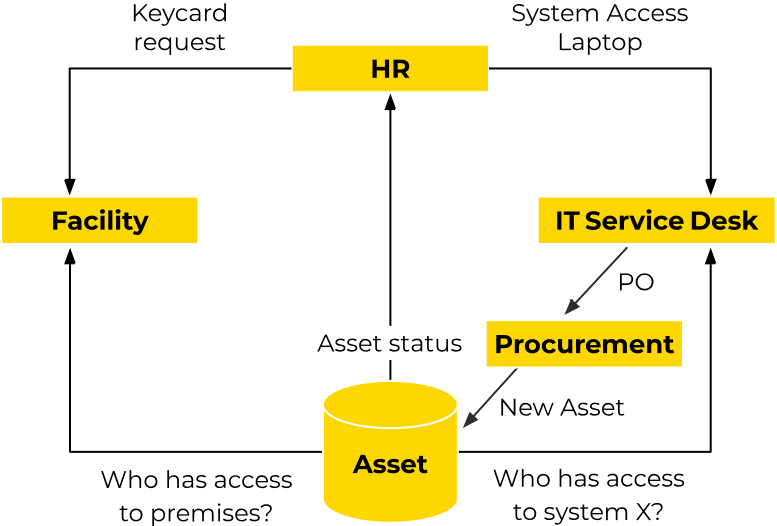
Business project template: HR uses a business project template to initiate onboarding. They set up tasks for creating an employment contract, scheduling orientation sessions, and gathering necessary documents.
Workflow automation: Automated workflows trigger notifications to IT and facilities teams when a new onboarding task is created.
Service project template: IT receives a service request triggered by HR’s project. This request includes setting up a new email account, configuring necessary software, and providing access credentials.
Ticket management: IT manages these tasks using their service project template, ensuring each request is tracked, prioritized, and completed within the set SLA.
Service project template: Facilities receive a service request to prepare a workstation, including desk setup and access badges.
Collaboration tools: The facilities team uses collaborative tools within their service project to update the status of each task and coordinate with other teams.
Business project template: The procurement team contacts the IT service desk to obtain the equipment needed from the purchase order created by automation. When the laptop and phone arrive in the office, this is recorded in the Configuration Management Database (CMDB) asset registry. The IT service desk can then notify the new hire to come and pick up their laptop and phone.
Collaboration tools: The procurement team will use various methods to make the purchase, such as phone, email, and website forms, to mention a few. Jira is used to keep track of what to purchase as well as the requestor and recipient of the service or product.
Transparency: The onboarding project's progress is visible to all departments through shared dashboards and reports, ensuring transparency and accountability.
Communication: Teams use Atlassian integrated communication tools to discuss issues, provide updates, and ensure all onboarding tasks are completed smoothly and on time.
Retrospective meetings: After the onboarding process is completed, teams conduct retrospective meetings using the business project template to gather feedback and identify areas for improvement.
Knowledge management: Lessons learned and best practices are documented and stored in a centralized knowledge base, accessible to all departments for future reference. The security officer also knows who has access to the premises and to what applications.
Atlassian’s System of Work is designed to revolutionize how organizations manage their projects and services across various departments. By integrating specialized templates and tools for business, service, and software projects, Atlassian enables teams to streamline workflows, enhance collaboration, and maintain transparency.
Below are the key benefits of adopting Atlassian’s System of Work:
Efficiency: Streamlined workflows and automated processes reduce administrative overhead and accelerate task completion.
Transparency: Real-time dashboards and comprehensive reporting provide visibility into project status, fostering accountability and informed decision-making.
Collaboration: Integrated communication and task management tools enhance cross-departmental collaboration, ensuring all teams are aligned and working towards common goals.
Flexibility: Customizable templates and workflows cater to the unique needs of different departments, making it easier to manage diverse projects effectively.
With Atlassian’s System of Work, organizations can achieve
greater efficiency, transparency, and collaboration across
all departments, leading to more effective and cohesive
service management practices.
7. AI and what's next
Artificial intelligence (AI) is rapidly transforming service management. AI-driven solutions are increasingly integrating into service management tools, significantly improving service desks and practices. If you look into the tools that have already implemented these AI features, you’ll find they are rolled out quickly.
Software vendors invest heavily in this area since many organizations require the features mentioned below.
AI quickly analyzes incident data, identifies patterns, and suggests or implements resolutions without human intervention.
AI uses historical data to predict potential issues before they occur, enabling proactive problem management.
AI-driven chatbots and virtual assistants handle various service requests through natural language interactions.
AI-powered virtual assistants use NLP to effectively understand and respond to user queries, creating a more intuitive and user-friendly interaction.
AI enables sophisticated self-service portals, allowing users to resolve issues independently by accessing relevant knowledge articles or following guided troubleshooting steps.
Analyzing historical data and user behavior, AI predicts potential issues and alerts the service desk team before they escalate.
AI automates routine tasks like password resets, system updates, and user provisioning. It also streamlines ticket management by automatically categorizing, prioritizing, and routing service tickets, ensuring issues are addressed by the appropriate teams without delay.
AI automatically curates and updates knowledge bases, ensuring users always have the most relevant and accurate information. AI-driven search capabilities improve the accessibility of knowledge repositories.
AI analyzes user behavior and preferences to offer personalized service recommendations and solutions, enhancing user satisfaction and engagement.
AI-driven chatbots provide round-the-clock support, handling common queries and performing routine tasks.
AI tools provide valuable insights into service desk performance, identifying bottlenecks and areas for improvement.
AI significantly enhances service desk capabilities, making them more efficient, responsive, and user-centric. By incorporating AI into ITSM and ESM platforms, you can improve operational efficiency and enable your organization to deliver higher-quality and more proactive services.
For easy reading, receive this guide as a PDF by e-mail
Transitioning from ITSM to ESM allows organizations to streamline operations and enhance service delivery across all departments. By leveraging ITIL4’s comprehensive framework, ESM fosters improved efficiency, productivity, and collaboration.
Enterprise Service Management addresses the key challenges we mentioned earlier by breaking down silos, automating routine tasks, and simplifying processes with user-friendly tools. Advanced solutions like Jira Service Management provide the necessary functionality and adaptability for successful ESM implementation.
By adopting ESM, your organization can achieve cohesive and efficient service management, driving better performance, increased productivity, and higher employee and customer satisfaction.
Ready to improve your service management?
See how we can helpRelated guides
Ready to improve your service management?
Whether you're introducing ITSM, expanding to Enterprise Service Management, or modernising Jira Service Management, our experts can help you design, implement, and optimise your service management practices.


