What’s new in Eficode ROOT: April 2026
This April, our favorite tools are blooming with more than just seasonal allergies—they’re dropping fresh updates to keep your pipelines as clean as a spring-cleaned house. GitHub 3.19 and GitLab 18.9 are essentially in a race to see who can bake more AI into your workflow, while Artifactory 7.133 and Xray 3.137 have teamed up to make sure your artifacts are as secure as a vault (the literal kind, not just the HashiCorp one). Speaking of which, HashiCorp Vault 1.21.4 has arrived to patch up those tiny leaks, proving that even the best digital bouncers need a little tune-up now and then. It’s a great month to be a dev, provided you actually enjoy reading changelogs more than looking at cherry blossoms.
GitHub Enterprise Server
The latest evolution of our development platform arrives this month with the transition to version 3.19. This update focuses on high-level governance and internal efficiency, swapping out manual administrative hurdles for streamlined, automated controls. For the user, this means a significantly more reliable environment where tools work faster and security protocols, like the shift from old-school passwords to robust API tokens, happen behind the scenes to keep data safe. Application performance has been fine-tuned to ensure your workflow remains fluid even during peak enterprise activity. By consolidating Dependabot reviews into the native "Code Owners" system, the update also removes configuration clutter, letting you focus entirely on writing great code rather than managing redundant settings.
GitHub Enterprise Server is deprecating username/password API authentication in favor of Personal Access Tokens (address globally)
Standalone "reviewers" configuration for Dependabot has been retired (address globally)
Starting in version 3.21, networking syscalls in pre-receive hooks will be disabled by default -> (address internally) no significant affect or no direct affect on the customers, let’s keep only for our documentation
The background service Telegraf is being removed in version 3.20 -> (address internally) no significant affect or no direct affect on the customers, let’s keep only for our documentation
GitHub Apps can now be installed directly on the enterprise account, granting them a new set of powerful, enterprise-wide management capabilities. Using a single token, you can now:
- Programmatically audit, install, and uninstall GitHub Apps across all organizations within the enterprise. This high-powered permission significantly improves organization management at scale.
- Manage GitHub App installations across the enterprise.
- Handle SCIM provisioning and Single Sign-On (SSO) management.
- Manage Custom repository properties.
- Manage Custom organization roles owned by the enterprise.
- Handle Enterprise people management.
The delegated code scanning alert dismissal feature is now generally available. This update allows administrators to delegate the dismissal of these alerts to individual repository users. This delegation empowers responsible users to manage security findings and streamlines the remediation process directly within their repository.
For enhanced code scanning flexibility, administrators and security teams can now select between a default and an advanced CodeQL setup. The default option provides a straightforward workflow for standard security analysis. In contrast, the advanced setup offers more detailed control and customization, including the ability to use custom queries.
This release incorporates the CodeQL CLI version 2.22.4, which is used for code scanning. This version includes significant updates compared to the default version on GitHub Enterprise Server 3.18, expanding language support and analysis capabilities:
Enhanced Go Code Analysis
- Improved Coverage: CodeQL 2.22.0 offers more comprehensive analysis for Go codebases.
- Generics and Dataflow: The release extends support for Go's generics and enhances the precision of dataflow analysis, allowing for vulnerability and defect identification in a wider range of Go code patterns.
- Go 1.25 Support: Users can now scan projects built with the new Go 1.25 release.
Swift 6.1.2 Support
- CodeQL now supports analysis for projects using Swift 6.1.2, enabling security and quality analyses for organizations adopting the latest Swift updates.
Public Preview for Rust Support
- CodeQL now offers support for analyzing Rust projects in public preview. Organizations developing in Rust can begin early adoption of vulnerability detection and quality analyses. Note that Rust support is subject to change as feedback is gathered during this preview period.
GitHub Advanced Security customers can now use the generally available Dependabot metrics page to help administrators and security teams prioritize security fixes. The page offers valuable metrics, such as insights into open vulnerable dependencies, to inform and streamline vulnerability management.
The "reviewers" configuration option for Dependabot pull requests is retired. Reviewers are now determined by repository CODEOWNERS files. If your workflow depended on the "reviewers" option, update your automation to use CODEOWNERS for assigning pull request reviewers.
Enterprise administrators now have the ability to establish enterprise-wide custom organization roles. These roles apply across all organizations and provide a standard set of permissions for organization owners to assign. Organization owners cannot modify these enterprise-level roles.
Furthermore, we've increased the limit for custom roles. Enterprises and organizations can now create up to 20 custom roles per role type and owner. Consequently, an organization owner can now select from a total of 40 custom roles.
Users can now efficiently duplicate an issue to any other repository using the new "Duplicate issue" action in the sidebar. This action streamlines workflows by prepopulating key details—including the title, description, assignees, labels, type, projects, and milestone—from the original issue.
This capability is ideal for reusing standard issue formats, breaking down large tasks, or creating tailored variants of an issue across different repositories. Users can easily edit any of the prepopulated fields before final creation to adjust the scope as needed.
Projects now support up to 50,000 active items and 10,000 archived items. The previous limit was 1,200 items total. There is no option to opt out of this increased limit.
YJIT, Ruby's Just-In-Time (JIT) compiler, is enabled by default. Users may experience faster application performance and improved resource efficiency across their instance.
GitHub will discontinue support for basic authentication (username and password) to APIs in upcoming versions of GitHub Enterprise Server (GHES).
New Authentication Methods:
- For testing and limited situations: Use a personal access token instead of password authentication.
- For production applications: Authenticate using the web applications flow.
GitLab
The center of our collaborative universe shifts to version 18.9 this April, bringing a major boost to how we manage code and security. This update is all about putting more power and privacy in your hands, whether you’re fine-tuning AI models on your own infrastructure or just trying to find a file without losing your mind. For you, this means a much snappier experience navigating complex projects and a digital assistant that doesn’t just find security holes but actually helps you fix them. The new collapsible file tree lets you toggle through deep directories while keeping your place, so you can stop playing "where is that folder" and start coding. Plus, with self-hosted AI and Duo-powered vulnerability resolution, you get a smarter, more secure environment that respects your data sovereignty while doing the heavy lifting for you.
Archive a group and its content (all users)
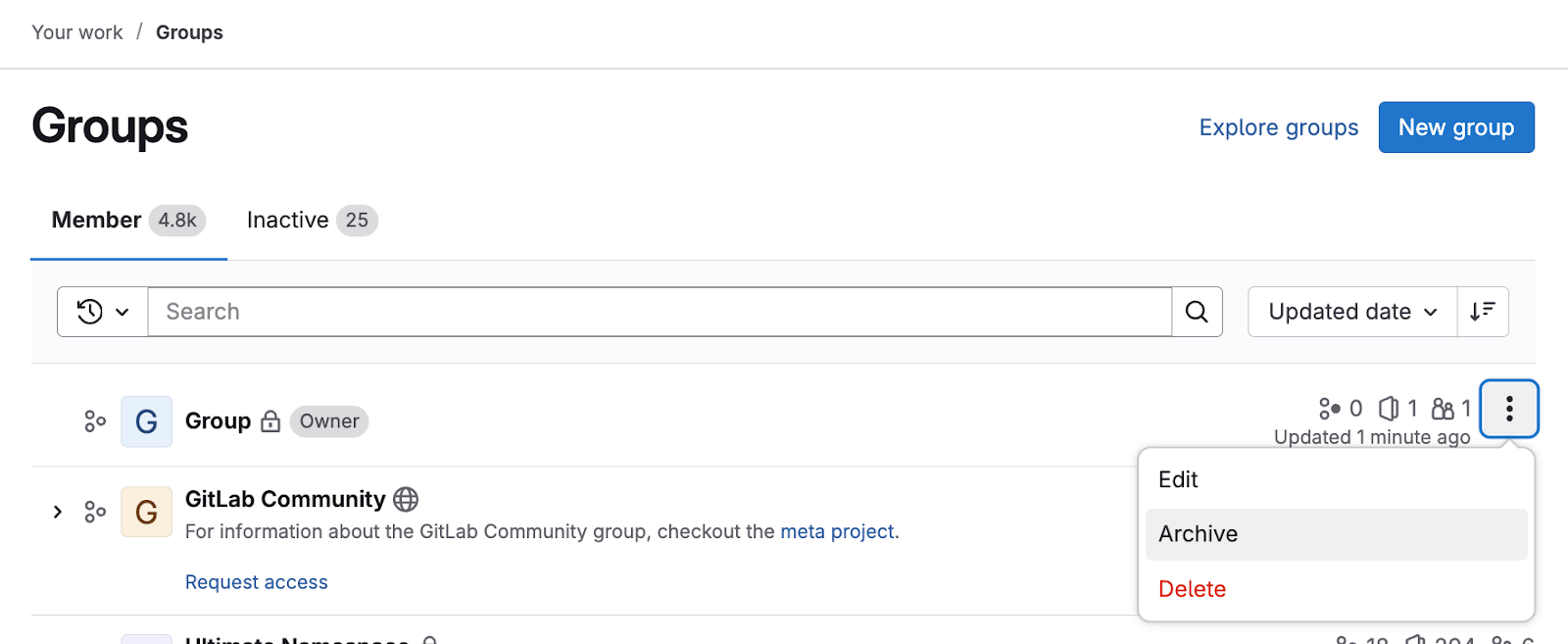
GitLab made managing completed initiatives and abandoned projects significantly simpler. You can now archive an entire group—including all its nested subgroups and projects—in a single action, eliminating the need to manually archive each item.
What happens when you archive a group?
- All nested subgroups and projects are automatically moved to the archive.
- The archived content is placed under the Inactive tab and clearly identified with status badges.
- The group's data remains fully accessible in a read-only mode for easy reference or restoration if needed.
- Write permissions are automatically disabled for the entire archived group and its contents.
This highly-requested feature drastically reduces administrative overhead and helps maintain an organized workspace by providing a clear separation between active and inactive work. Furthermore, you can now archive groups and projects directly from the actions menu in list views, moving this task beyond the Settings page and avoiding unnecessary navigation. Learn more here.
Non-billable Minimal Access users (Premium)
Premium users will now benefit from a key change related to user provisioning via identity providers (IDPs). Previously, IDP syncs could lead to administrators having to purchase extra seats or manually intervene to prevent failures when the number of synced users exceeded the licensed seat limit.
The good news is that the Minimal Access role on GitLab Self-Managed Premium no longer counts as a billable seat, matching the behavior on GitLab.com Premium/Ultimate and GitLab Self-Managed Ultimate.
This update activates the restricted access feature. With this feature enabled, users who would normally exceed the seat limit during IDP synchronization are automatically assigned the Minimal Access role. This critical change ensures smooth, uninterrupted IDP syncs while preventing unexpected billing overages and eliminating the need for manual intervention. Learn more here.
GitLab Duo Agent Platform Self-Hosted models now available for cloud licenses (Premium, Ultimate)
GitLab Duo Agent Platform is now generally available for customers who utilize a cloud license. This feature is billed based on usage.
Administrators have the capability to set up compatible models for the GitLab Duo Agent Platform. If using AWS Bedrock or Azure OpenAI, administrators can also configure Anthropic Claude or OpenAI GPT models. Learn more here. Learn more here.
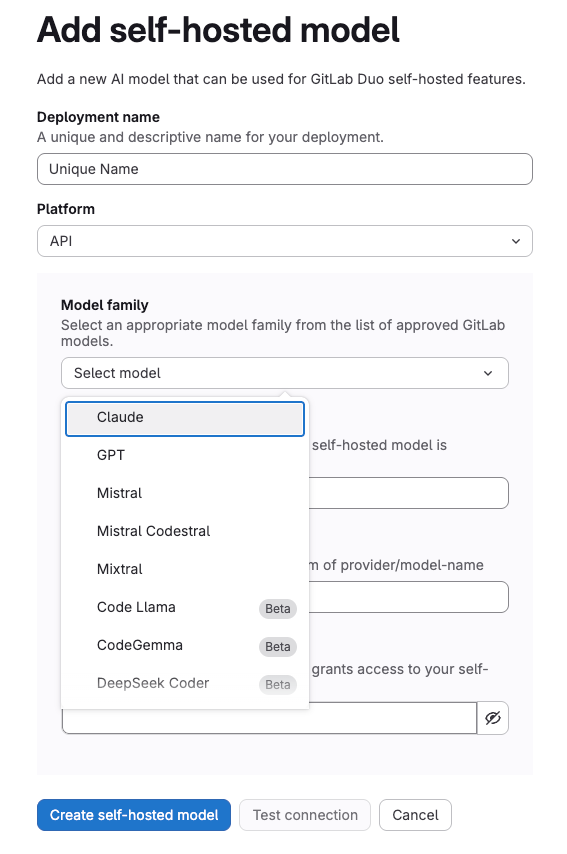
Addition of self hosted model.
View security reports from child pipelines in merge requests (all users)
Merge request widgets now offer direct access to security and compliance reports from child pipelines. This eliminates the need to manually navigate multiple pipelines to find security issues, streamlining workflows, especially for monorepos and complex testing environments.
The enhanced merge request widget presents a unified security overview by displaying reports from child pipelines alongside the parent pipeline's results. Each child pipeline's reports are presented individually, and the corresponding artifacts are available for download. This central view accelerates merge request reviews and significantly reduces the time spent investigating failures when utilizing parent-child pipelines. Learn more here.
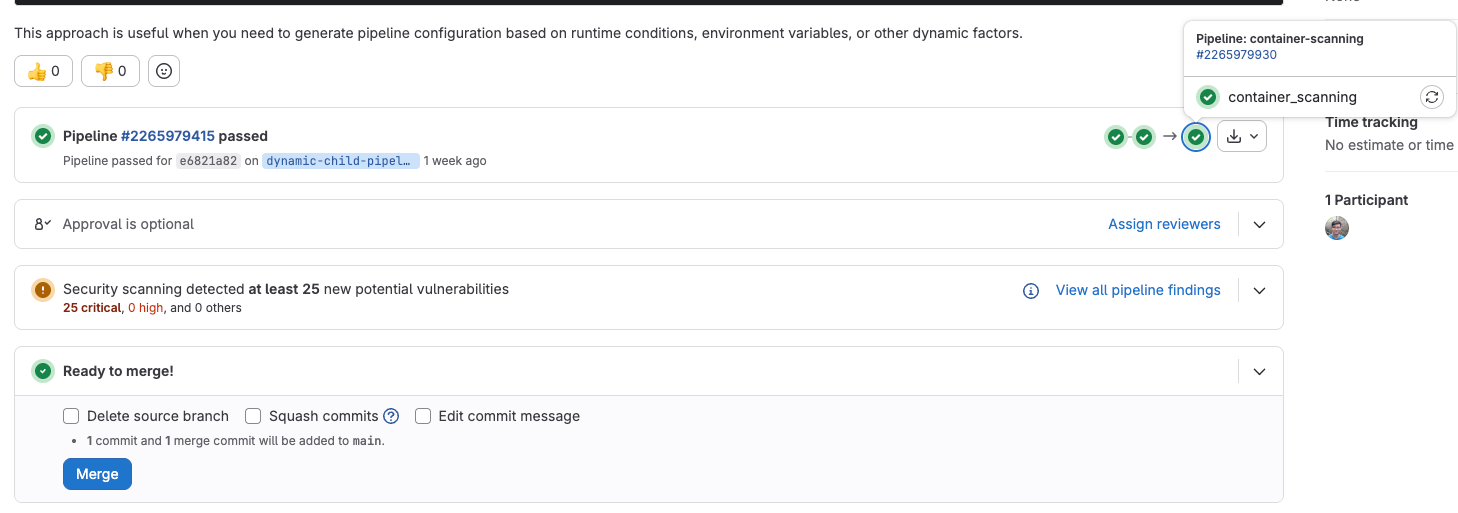
Reports from child pipelines visible alongside parent pipeline results.
Rapid Diffs improves performance for commit changes (all users)
Reviewing large commits with many changes can often slow down your workflow. We are excited to announce that the commits page (/-/commits/<SHA>) now utilizes Rapid Diffs technology to dramatically improve performance.
Key Benefits of Rapid Diffs:
- Significantly Faster Loading: Get to the code faster with an accelerated initial page load.
- Seamless Experience: Enjoy a pagination-free environment for smoother browsing.
- Enhanced Navigation: A refreshed interface includes a new file browser, making it quicker to jump between files.
- Improved Responsiveness: Maintain smooth, responsive interactions, even when dealing with commits that have a high number of changed files.
All original functionality remains available. Look forward to these same performance advantages as we continue to roll out Rapid Diffs to other areas of GitLab. Learn more here.
Navigate repositories with collapsible file tree (all users)
GitLab introduced a new collapsible file tree for browsing repository files. This feature significantly enhances navigation by offering a comprehensive and structured view of your project.
Key Benefits:
- Maintain Context: Easily expand and collapse directories inline, allowing you to jump between files in different parts of your repository without losing context.
- Efficient Navigation: The file tree appears as a resizable sidebar when viewing repository files or directories. Toggle its visibility with keyboard shortcuts, and filter files by name or extension to navigate complex project hierarchies quickly.
- Scalable Performance: With fewer page loads required to move between files, this feature is effective for projects of all sizes, from small codebases to large repositories with thousands of files.
- Synchronization: The tree automatically synchronizes with your current location; selecting a file in the main content area updates the tree to show its location.
- No Structural Changes: Your existing repository structure and file organization remain completely unchanged.
Learn more here.
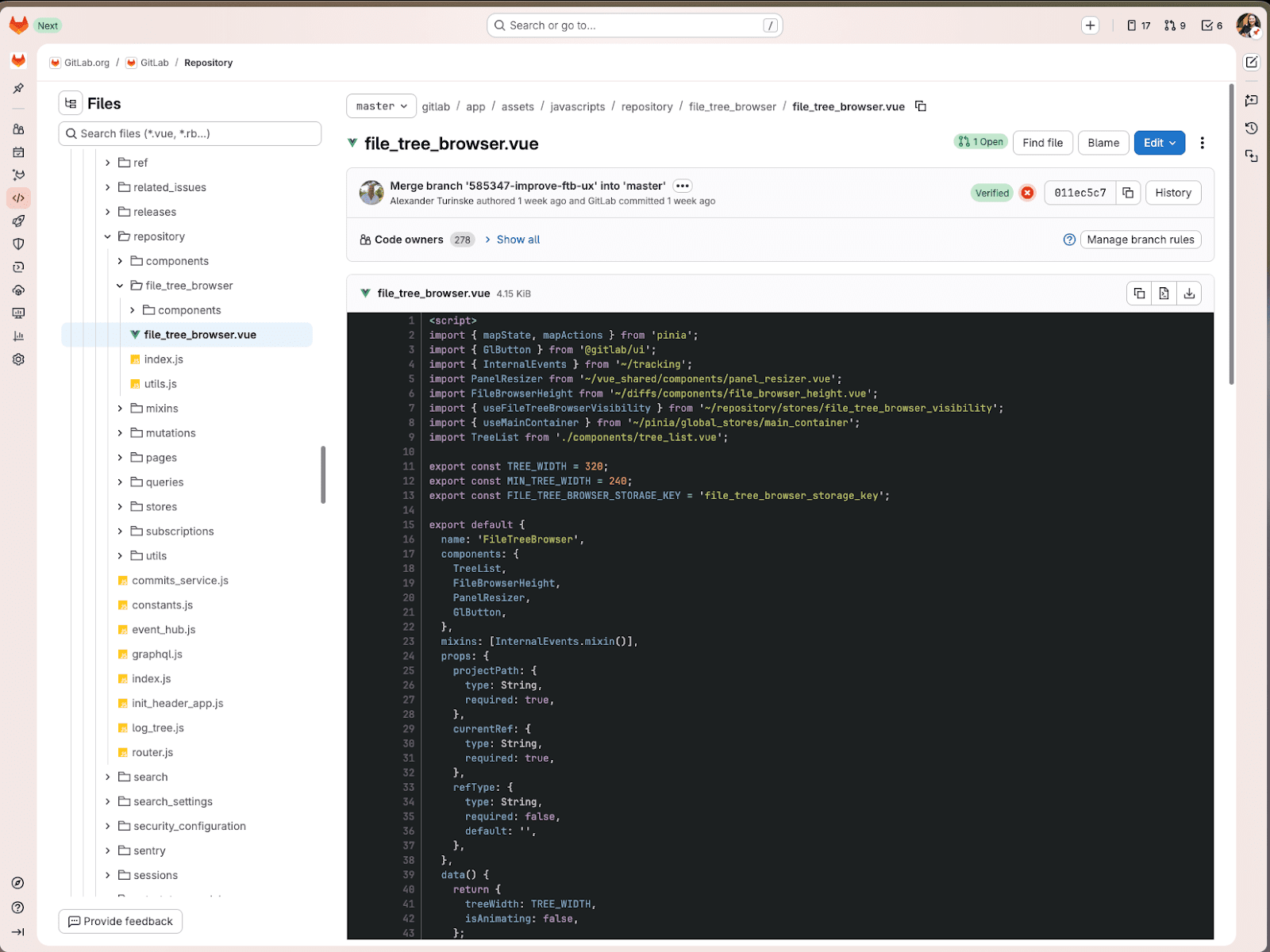
Collapsible file tree.
Add timestamps to CI job logs (all users)
To help you identify performance bottlenecks and debug prolonged jobs, Continuous Integration (CI) job logs now include timestamps on every line. These timestamps are displayed in Coordinated Universal Time (UTC) format.
Leverage this feature to:
- Troubleshoot performance issues.
- Pinpoint specific bottlenecks.
- Measure the precise duration of individual build steps.
Note: This feature requires GitLab Runner version 18.7 or later. Learn more here.
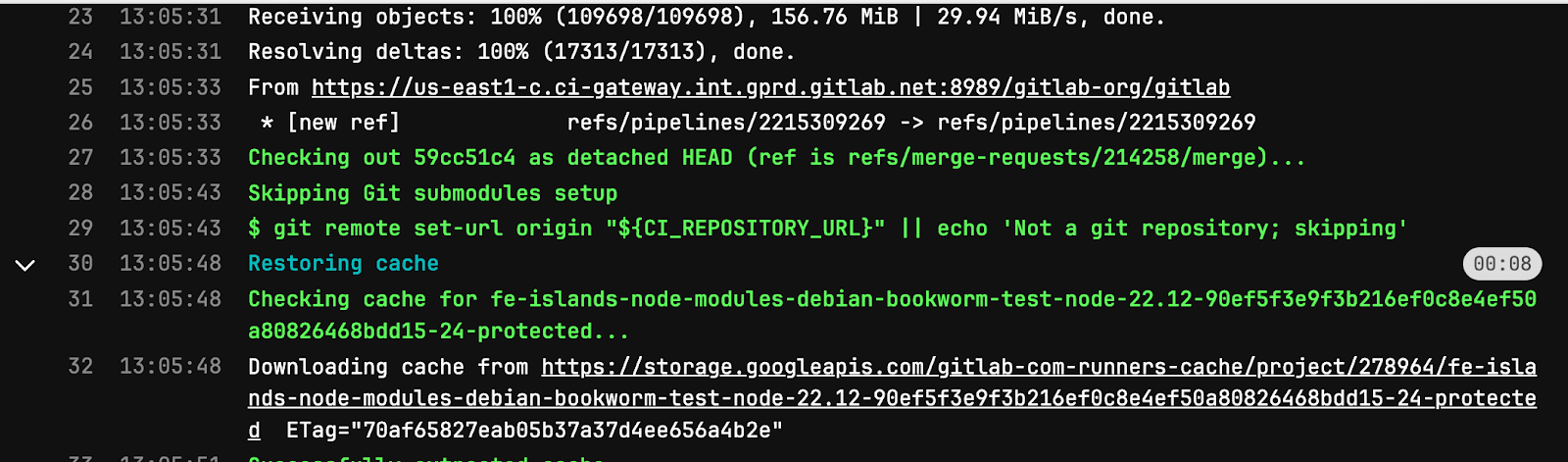
Timestamp added to CI job logs.
CI/CD Catalog component analytics (all users)
Teams now have clear visibility into the usage and adoption patterns of their CI/CD Catalog component projects across the organization. This update allows you to easily view usage counts, providing high-level insight into which component projects deliver the most value, enabling better optimization of your catalog investments. Previously, this visibility was not available. Learn more here. Learn more here.
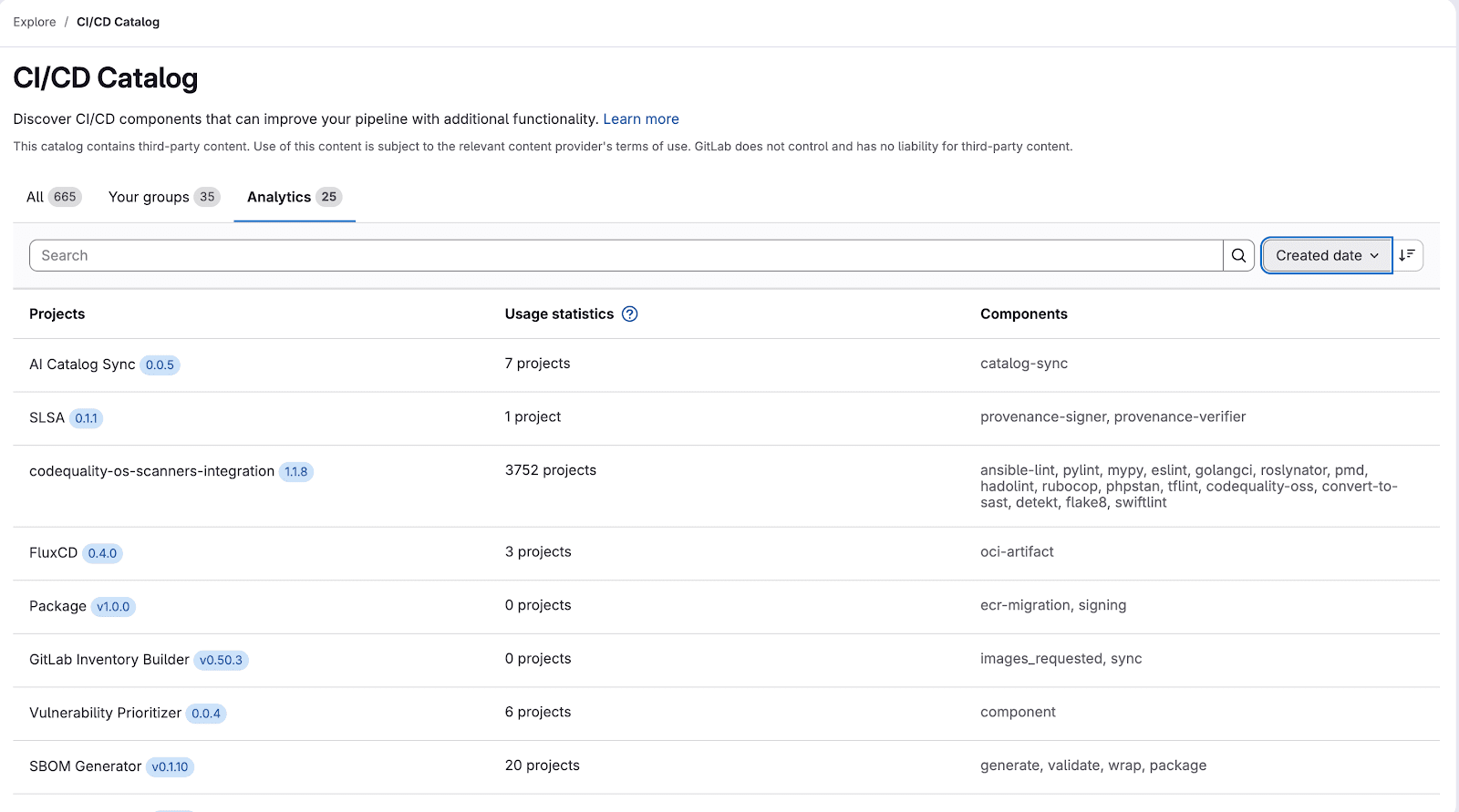
View on usage counts and adoption patterns.
View CI/CD job metrics for projects (limited availability) (Premium, Ultimate)
GitLab CI/CD analytics has been enhanced to combine performance trends for both CI/CD pipelines and individual jobs. This new capability, integrated directly within the GitLab UI, allows developers to quickly pinpoint inefficient or problematic CI/CD jobs. By providing these tools in context, developers can effectively identify and resolve CI/CD performance bottlenecks that could otherwise severely hinder development team velocity and overall productivity. Furthermore, for platform administrators managing GitLab at an enterprise scale, this consolidated CI/CD job data can minimize the reliance on external or custom-built CI/CD observability solutions. Learn more here.
Note: Clickhouse is required!
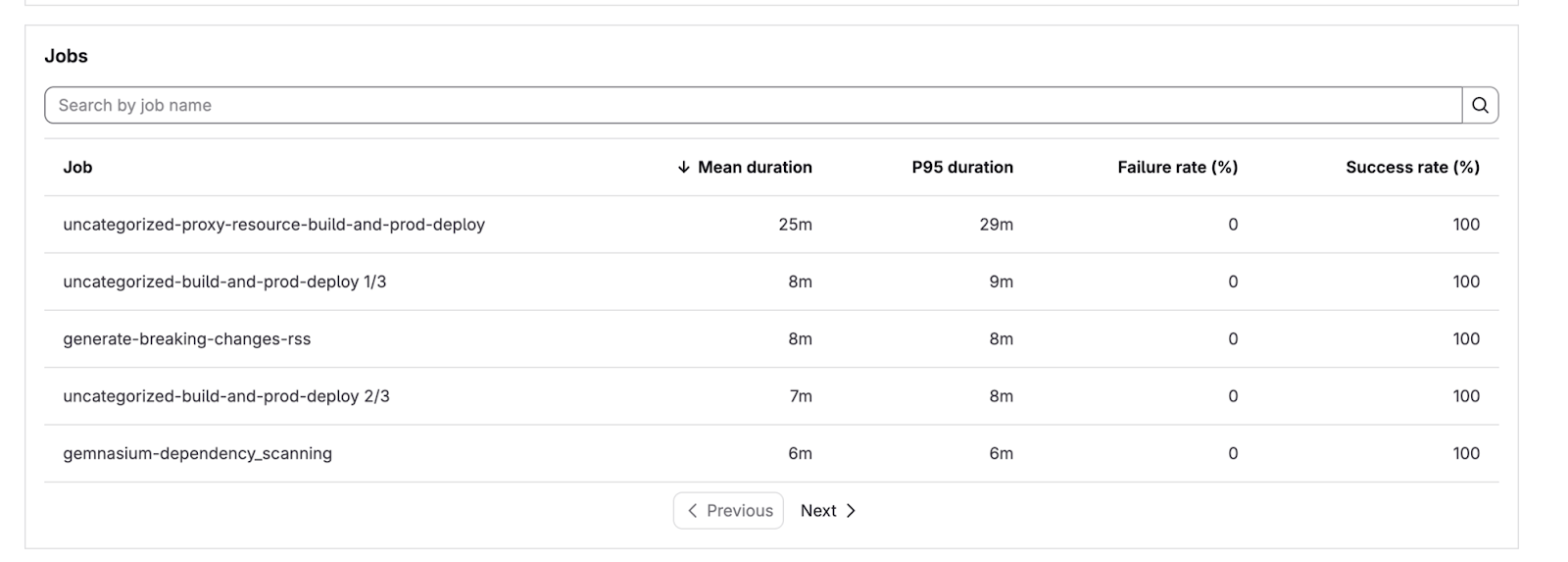
CI/CD pipeline and CI/CD job performance trends.
Geo data management view on primary site (Premium, Ultimate)
GitLab introduced a new data management view on the primary Geo site to significantly simplify data integrity verification and troubleshooting. This enhancement eliminates the previous requirement of accessing secondary sites for basic verification tasks.
Key benefits of the new data management view on the primary site:
- Centralized Status Viewing: You can now view the detailed verification status for all replicable data types directly from the primary site.
- Direct Troubleshooting: Perform data sanitization and troubleshooting tasks without leaving the primary UI.
- Simplified Setup: Configure and verify your Geo setup on the primary site before integrating any secondary sites.
This is the initial step toward offering comprehensive, self-serve troubleshooting via the UI, aiming to reduce the necessity of switching between multiple sites for routine maintenance and issue resolution. Learn more here.
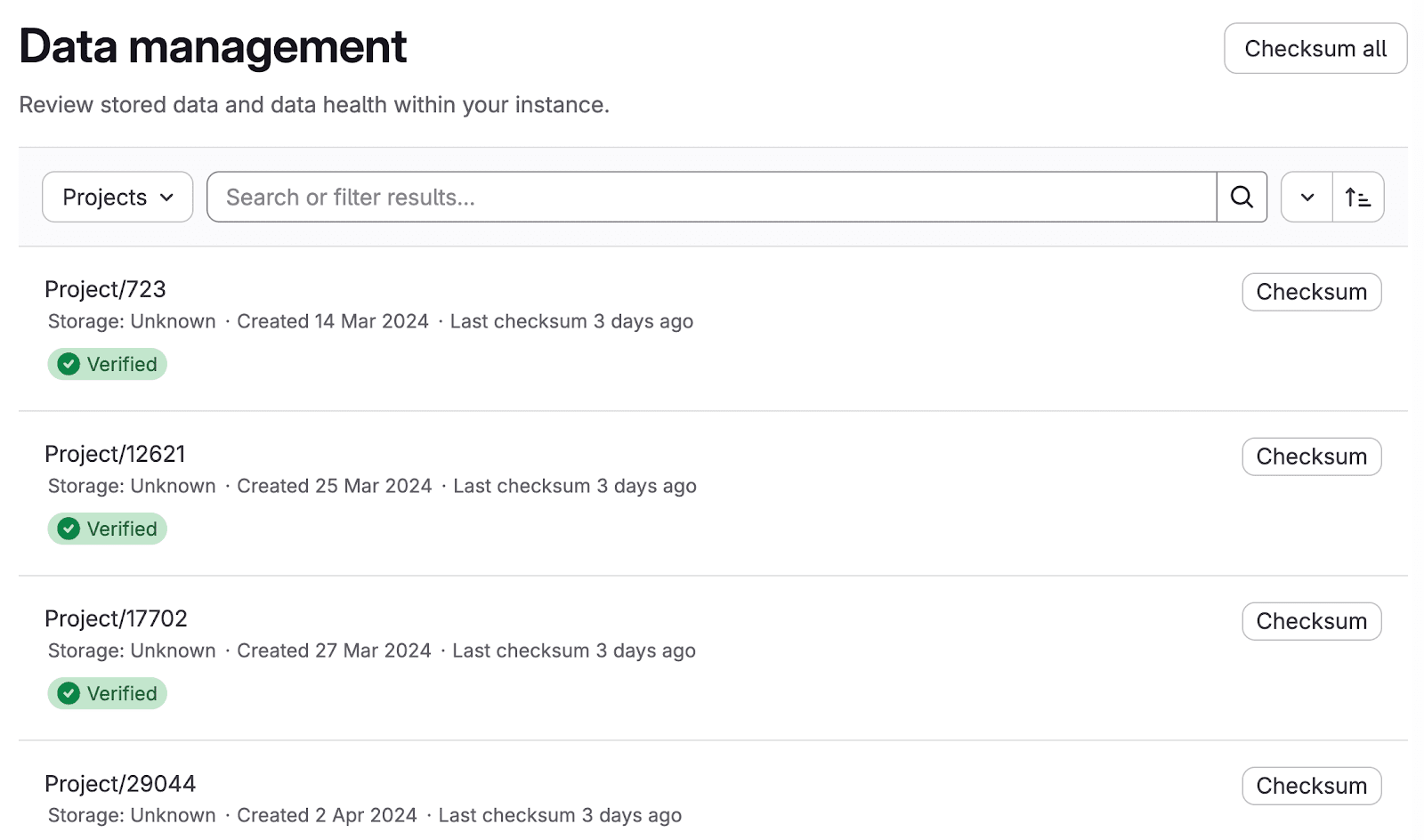
Geo data management view.
Include CI/CD inputs from a file (all users)
OAuth support in JetBrains IDEs for Self-Managed and Dedicated (Premium, Ultimate)
All JetBrains users can now benefit from a quicker and more secure sign-in experience for the GitLab Duo plugin. The plugin now supports OAuth authentication for GitLab Self-Managed and GitLab Dedicated, eliminating the need for a personal access token. Learn more here.
Container virtual registry now available (Premium, Ultimate)
- Simplified Configuration: Platform engineers can configure Docker Hub, Harbor, Quay, and others using long-lived tokens via one central URL.
- Improved Performance: Intelligent caching speeds up pull operations.
- Centralized Access Control: It integrates with GitLab's authentication systems for unified access control and audit logging.
Beta Availability:
Learn more here.
Centralized security governance and configuration
This release significantly enhances security management capabilities, providing security teams with a centralized command center to secure your organization at scale. Key updates include the introduction of customizable security configuration profiles and a powerful, upgraded security inventory dashboard.
Profile-Based Security Configuration for Scalable Governance
GitLab is shifting from manual, project-specific YAML file editing to preconfigured security configuration profiles, starting with the secret detection profile. This new approach offers substantial benefits:
- Standardized Governance: Profiles enforce consistent security best practices and appropriate boundaries across your organization without requiring custom role configurations or hindering developer productivity.
- Simplified, Scalable Management: Apply the same security configuration profile across hundreds or even thousands of projects with a single action.
The initial secret detection profile provides:
- Active Prevention: It proactively identifies and blocks secrets from being committed to any repository.
- Unified Workflow Management: A single profile manages secret detection across your entire development workflow, eliminating the need to maintain separate configurations for different trigger types.
The security inventory has been enhanced to serve as the core dashboard for assessing the security posture of every group and project:
- Clear Hierarchy Visualization: Easily distinguish between subgroups and projects within the inventory using clear iconography.
- Efficient Bulk Actions: The new Bulk Action menu allows users to apply or disable security scanner profiles simultaneously across all selected projects and subgroups.
- At-a-Glance Coverage Status: Gaps in coverage are quickly identifiable via color-coded status bars (Enabled, Not Enabled, or Failed), complete with tooltips providing detailed information.
- Detailed Profile Status: Profile details now include indicators showing which trigger types are available.
Learn more here.
GitLab Duo Agent Platform available in Ultimate trials
Teams interested in GitLab can now explore its agentic AI features, which automate complex development workflows and minimize manual effort.
To try this, sign up for a GitLab Ultimate trial. The trial includes access to the Duo Agent Platform and 24 evaluation credits per user, allowing hands-on testing of autonomous task execution and multi-step workflow orchestration for 30 days.
Please note that the evaluation credits expire 30 days from the provisioning date, so ensure your team is ready to start before signing up. Learn more here.
Dependency Scanning with SBOM support for Java pom.xml manifest files
GitLab dependency scanning, which utilizes Software Bill of Materials (SBOM), now supports Java Maven projects by directly analyzing pom.xml manifest files. Previously, dependency scanning for these projects mandated the presence of a graph file. If a graph file is unavailable, the analyzer will now automatically use the pom.xml file instead, extracting and reporting only direct dependencies for vulnerability analysis. This enhancement simplifies the process for Java projects to enable dependency scanning. Let us know if you would like to enable this feature. Learn more here.
Security attributes
Security attributes, which were introduced in GitLab 18.6 as a beta feature, have now reached general availability. These attributes enable security teams to enrich project data with business context. This context includes predefined categories such as business impact, application, business unit, internet exposure, and location. Furthermore, organizations can define custom attribute categories to align with their specific taxonomy. The application of these security attributes facilitates better filtering and prioritization of items within the security inventory, allowing teams to focus on risks based on organizational context and risk posture. Learn more here.
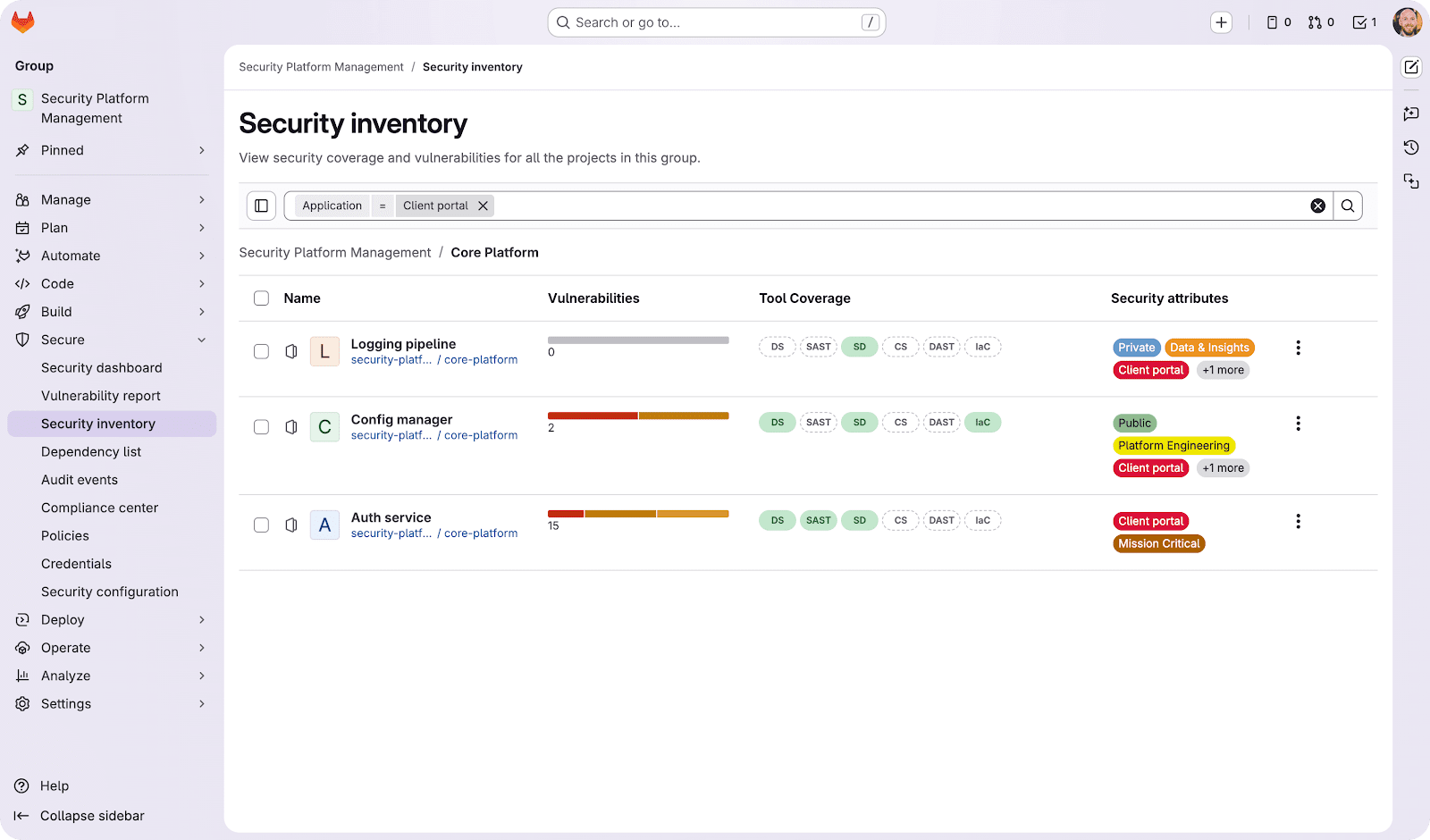
Security attributes inventory view.
Dependency Scanning with SBOM support for Python requirements.txt manifest files
GitLab's dependency scanning, which utilizes Software Bill of Materials (SBOM), has been expanded to support Python's requirements.txt manifest files. This is a significant enhancement because, previously, Python dependency scanning required a lock file. Now, if a lock file is not present, the analyzer automatically defaults to scanning the requirements.txt file. In this fallback scenario, it extracts and reports only direct dependencies for vulnerability analysis. This change simplifies the process for Python projects to enable dependency scanning, removing the necessity for a lock file. If you would like to enable this feature let us know. Learn more here.
Security dashboards: Vulnerabilities over time chart improvements
The Vulnerabilities over time chart has been improved to accurately reflect your active vulnerability inventory. Previously, the chart included vulnerabilities that were no longer detected, which resulted in inflated figures that did not accurately represent the current state of active vulnerabilities. Learn more here.
Vulnerability resolution with GitLab Duo Agent Platform (Beta)
This new feature, powered by GitLab Duo, resolves vulnerabilities autonomously. Upon triggering the resolution, GitLab Duo analyzes the finding, assesses the surrounding code context, generates a precise, context-aware fix, and automatically creates a ready-to-review merge request—all without manual intervention.
Key Features:
- Agentic Multi-Step Resolution: Utilizing the GitLab Duo Agent Platform, the system moves beyond simple code suggestions. It reasons through the vulnerability, evaluates the codebase thoroughly, and produces an informed, comprehensive fix.
- Automatic Merge Request (MR) Creation: For critical and high-severity SAST vulnerabilities, the system generates an MR that includes the proposed code fix, ready for review.
- Quality Scoring: Every generated fix is accompanied by a quality assessment score, giving reviewers quick confidence metrics for the suggested remediation.
The Agentic SAST Vulnerability Resolution can be initiated directly from both the general vulnerability report and the individual vulnerability details pages. Learn more here.
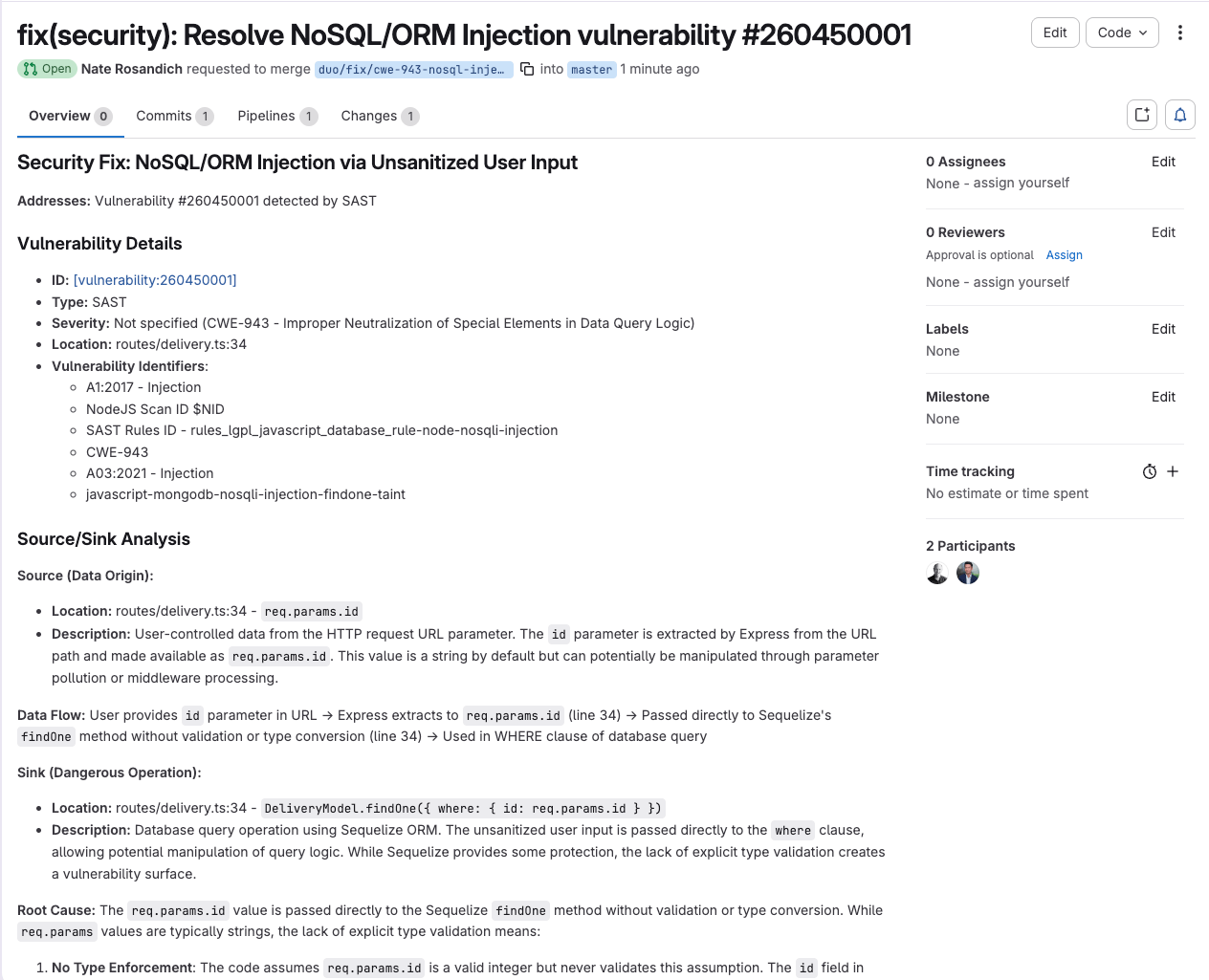
Vulnerability report.
New security dashboard chart: Vulnerabilities by age
The new Vulnerabilities by age chart provides a clearer understanding of vulnerability lifecycle within your environment. This chart illustrates the time distribution of unresolved vulnerabilities since their initial detection. Grouping options, such as by severity or report type, are available to help pinpoint areas requiring immediate remediation efforts. Learn more here.
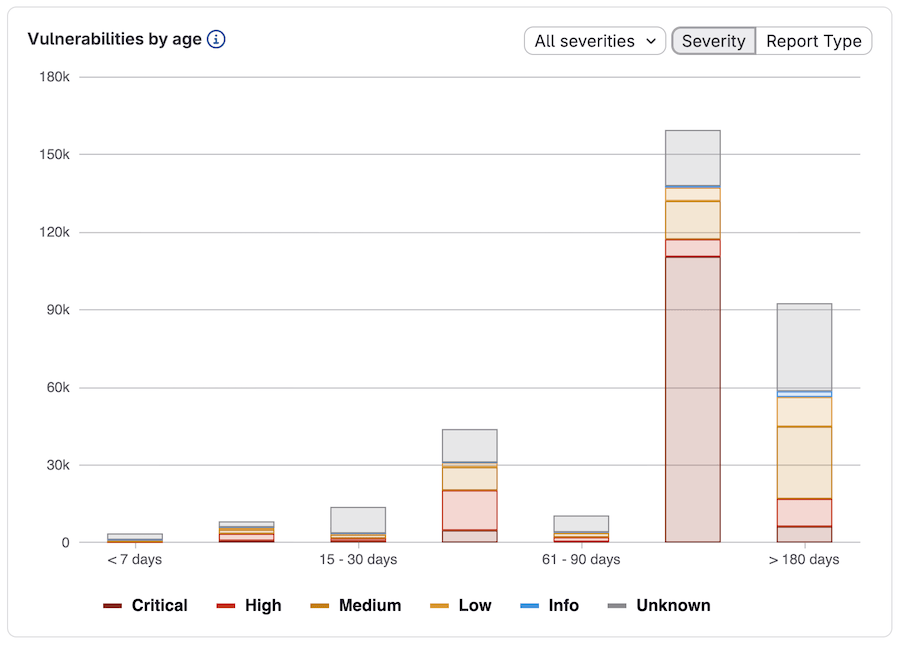
Vulnerabilities by age chart.
JFrog Artifactory
The heart of our artifact management receives a significant polish this April with the move to version 7.133. This update streamlines your daily interactions by refreshing the interface and expanding support for modern tools like the uv and pnpm clients, ensuring your tech stack stays current without the friction. For you, this means a more intuitive dashboard that doesn't just look better, but actually responds faster when you're hunting down critical dependencies. The underlying performance improvements reduce system overhead, allowing the platform to handle massive concurrent requests with ease while you enjoy a snappier, more reliable UI. By embracing these new client integrations, the platform ensures that your favorite emerging development tools work flawlessly right out of the box, saving you from tedious manual workarounds.
When migrating from the legacy Federation service to RTFS, be sure to use version 2.0 of the CLI, which implements the new context path.
Release Bundle v2 creation dry run
The Create Release Bundle v2 REST API now supports a dry run option. This feature allows you to simulate the creation of a Release Bundle v2, executing all required validations without actually persisting the bundle.
For detailed information, refer to the documentation on Perform a Release Bundle v2 Creation Dry Run.
New REST API for deleting the tag from a Release Bundle v2 version
A new, dedicated REST API is now available to improve the user experience by allowing you to delete tags from a Release Bundle v2 version. Learn more here.
RLM promotion rollback from platform UI
New feature in the platform UI arrived to enhance user experience: the ability to roll back a Release Bundle v2 version promotion. This new functionality, detailed in the Promotion Rollback guide, replaces the previous 'delete promotion' action, and as such, the corresponding UI icon has been removed. Learn more here.
Audit trail maintained when promoting duplicate Release Bundle artifacts
During previous Release Bundle v2 promotions, the system would skip artifacts that already existed in the target stage. This led to a gap in the audit trail, as the evidence associated with those artifacts was not copied over. This update now ensures a complete and verifiable audit trail throughout your SDLC by guaranteeing that all associated evidence is copied to the target stage, even for pre-existing artifacts.
Significantly Improved Package Details User Interface
The Package Details user interface (UI) in Eficode ROOT has received significant improvements to enhance the visibility and usability of package version information.
Key updates include:
- Improved Package Version Display: The UI now offers a more user-friendly format for viewing crucial details.
- Default View: When you first open the Package Details view, the latest version or tag of the package is immediately displayed.
- Context-Sensitive Terminology: The UI uses native terms based on the package type (e.g., "tags" for Docker/OCI, and "versions" for other package types).
- Quick Version Selection: Easily find the version you need with a new quick selection feature.
- "All Versions" View: This dedicated view supports quick impact analysis, showing vulnerabilities and storage locations across all package versions.
- Expanded Installation Commands:
- Multi-Client Support: Installation commands are now provided for all officially supported clients for every package type.
- More Package Types: The new UI introduces 35 new installation commands, making it easier for developers to utilize the packages they need.
- Dynamic Information Tabs: Important version details are displayed in context-sensitive tabs that adapt based on the specific package type.
Learn more here.
Significant Improvements in the Repositories User Interface
- Quick Access Views: Upon opening the Repositories list, users can immediately view the 20 most recently viewed repositories or filter the list to show inactive repositories.
- Comprehensive Filtering: New filtering options provide granular control over the displayed list. Users can now filter repositories by:
- Repository type
- Package type
- URL (for remote repositories)
- Project association
- Stage
- Replication status (repositories that have a replication, applicable to local and remote repositories)
Support for .dsc
Local Debian repositories now include support for Debian source packages (.dsc Source packages). To utilize this feature, configure your sources.list file for source packages. Once configured, you can deploy the individual component source package files to your local repository. These can then be resolved as a single package using the apt-get source command. Learn more here.
New REST APIs for VCS Remote Repositories to Obtain Data from Subgroup
This Artifactory version introduces several updates related to VCS remote repositories, specifically concerning subgroup repositories and the Google Source Git Provider.
Key Changes:
- New REST APIs for Subgroup Repositories: Four new APIs have been added to facilitate downloading data from subgroup repositories:
- Download a VCS Branch from a Subgroup Repository
- Download a VCS Tag from a Subgroup Repository
- Download a File in a VCS Branch in a Subgroup Repository
- Download a File in a VCS Tag in a Subgroup Repository
- Enhanced Legacy APIs: The existing Get VCS Tags and Get VCS Branches APIs can now also retrieve VCS tags and branches from subgroup repositories.
- Download Format Restriction: Currently, branches and tags can only be downloaded in the .tar.gz format.
- Google Source Git Provider Support: These updated and new APIs can now be used to obtain data from the Google Source Git Provider.
Google Source Git Provider for VCS Remote Repositories
Support has been added in the Artifactory user interface for the Google Source Git Provider for VCS remote repositories. Learn more here.
Supported Clients and Versions
Artifactory now offers enhanced support for several popular clients, extending its capability to securely manage and cache various package types:
- Kiro with AI Editor Extension Repositories: You can now configure Artifactory to securely proxy and cache the Kiro extension marketplace. This allows your Kiro IDE to download extensions directly from the Artifactory cache. Learn more here.
- pnpm with npm Repositories: The pnpm client can now be configured to connect to npm repositories in Artifactory for managing npm packages. Learn more here.
- uv with PyPI Repositories: The uv client can now be configured to connect to PyPI repositories in Artifactory for managing Python packages. Learn more here
- Yarn Modern with npm Repositories: Artifactory now provides native support for managing npm packages using Yarn V2+ (Modern).
- For details, see: Connect Yarn to Artifactory.
JFrog CLI commands for setting up IDEs with AI Editor Extension and JetBrains Plugins repositories
The new jf ide setup command streamlines the connection of your IDE to an AI Editor Extensions or JetBrains Plugins repository in Artifactory. This single command automatically configures any supported client, eliminating the need for manual permission grants and configuration file edits. Learn more here.
Curation Support Added for PHP Composer Remote Repositories
JFrog Curation now protects Composer repositories in Artifactory, guaranteeing security compliance. When a security policy blocks a package, Artifactory automatically prevents the Composer client from attempting to download it from external source URLs.
Added Support for the Range Header in Download Requests for PyPI Repositories
Artifactory now offers better compatibility and performance for Python package downloads, particularly when using the UV package manager. It achieves this by supporting Range requests for downloading packages from local, remote, and virtual PyPI repositories. This improvement avoids redundant full-package downloads and reduces unnecessary download counts.
Added Support for Proxying the GitHub Enterprise Cloud Private Registry for Go Remote Repositories
GitHub introduced support for proxying Go remote repositories to the GitHub Enterprise Cloud private registry (<comanyName>ghe.com).
Bridge URLs in Remote Repositories
Bridge URLs can now be used in remote repositories without additional configuration.
Retention Policies - Package Version Pattern Filtering
Cleanup and Smart Archiving retention policies now support Include and Exclude Package Version Patterns. Learn more about Cleanup Policies and Smart Archiving.
Improved the Run reports generated by Retention Policies for packages (Cleanup and Smart Archiving)
The Run Detailed Summary reports have been enhanced with new columns—Package Path, Created Date, Modified Date, and Last Downloaded Date—to significantly improve the validation and auditing processes for packages that have been deleted or archived.
PSS Padding: Secure PSS padding is now supported for signatures when creating evidence via APIs, simplifying integration. PKCS#1 v1.5 padding remains supported.
Base64 URL Encoding: The system now supports Base64 URL encoding for the DSSE signature, in addition to standard Base64.
New Evidence Query APIs
- REST APIs: Two new REST APIs are available for evidence queries (Search Evidence and Get Evidence by ID), offering a traditional integration alternative to GraphQL.
Enhanced SCIM REST API Access
The JFrog Platform now provides richer information regarding your SCIM configuration and schemas through new REST API endpoints.
Support for Filtering Tokens by Scope via REST API
The JFrog Platform Access service now enables you to expire and un-expire all passwords via REST API.
Added Support for Project Admin Permissions
Project administrators in the JFrog Platform can now benefit from more precise permission management. This update allows for granting the "Manage Resources" permission to project admins while restricting their ability to create or manage remote repositories.
Logging of Administration Configuration Changes
The Access audit trail log in the JFrog Platform now records changes made to the access configuration, including the enabling of anonymous access.
Support for Webhook Target Validation
The JFrog Platform has been updated to include a new feature for Artifactory Webhooks: a whitelist can now be configured to permit the use of private domains or IP addresses as Webhook targets. This enhancement eliminates the need to disable Artifactory validation for these private targets.
Support Added for Decompressing .xz and tar.xz Files
Artifactory has extended its decompression capabilities to include .xz and tar.xz files. This is in addition to the existing support for .zip, .tar, and .gz formats.Jfrog Xray
The security layer of our supply chain reaches a new milestone this April with the transition to version 3.137. This update focuses on total transparency by allowing the integration of security data from any source and providing a clearer map of how vulnerabilities actually affect your specific code. For you, this means no more guessing games when a high-priority alert pops up, as the revamped Impact Path UI visually guides you to the exact root of the problem. You can now effortlessly import external Software Bill of Materials (SBOMs) to maintain a unified source of truth for all your third-party components. Furthermore, expanded support for multi-architecture image scanning ensures that whether you are deploying on ARM or x86, your containers are scrutinized for threats with the same rigorous precision.
JFrog Advanced Security has been enhanced with Transitive Dependency Analysis. This new feature provides deep contextual insights into vulnerabilities stemming from indirect (transitive) dependencies.
For any given Common Vulnerability and Exposure (CVE), users can now access:
- Vulnerability Path Visibility: The complete call chain leading to the vulnerable function, clearly indicating if the call is direct or transitive.
- Visual Aid: A call graph that illustrates the path of the dependency.
- Actionable Evidence: Highlighted evidence (like functions, file paths, and line numbers) with a one-click copy option for simple sharing.
Learn more here.
Added support for additional Maven repositories:
Enhanced Tracking and Analysis for Curation Audit
The Curation Audit now features expanded filtering capabilities for more efficient tracking and analysis. You can now filter by Reason, Requester Email (searchable), Origin, and Condition Name.
Improved Package Visibility
You can now search for a package without needing to specify a version, which allows you to see all available versions at a glance.
New Ecosystem and Platform Support & Waiver Workflow Enhancements
Expanded Ecosystem Support:
- Catalog and Curation policies now support the Pub ecosystem.
- PHP Composer support has been added to Catalog and Curation policies.
- Support for Debian and Ubuntu has been integrated into Catalog and Curation policies.
Enhanced Waiver Workflow:
- Developers can now request waivers from policy owners for blocked packages directly through the API and UI, supplementing the existing CLI-based waiver request process.
Improved Impact Path Visualization
The Impact Path view now features an improved, more intuitive tree-based visualization, replacing the former Bullseye layout. This update significantly enhances clarity and navigation.
Enhanced SBOM License Management
The SBOM tab has been enhanced to support the critical task of managing OSS license information for components. Users can now easily open any component in the SBOM tree to review detected licenses and then add, remove, or correct license entries directly within the UI. This functionality is essential for ensuring accurate license attribution and improving compliance reporting for all scanned artifacts. Learn more here.
Xray Enhancements for Multi-Architecture Images and License Text Retrieval
Multi-Architecture Image Scanning: Xray now provides support for scanning multi-architecture images. The scanning results are consolidated into a single, unified summary for the entire image, while still including individual scan details for each distinct architecture present.
Complete License Text in Attribution and SBOM: The Attribution and Software Bill of Materials (SBOM) now include the full license text for generic licenses.
Two new REST API functionalities:
Jira Integration Status: A new API endpoint, Get Jira Integration Status, allows users to programmatically check the current operational health and status of an existing Jira integration.
SBOM Migration Status: A new REST API endpoint, /api/v1/sbomMigration/status, has been added to retrieve the current status of the SBOM migration process.
Enhanced Security Features
Added support for ingesting VEX (Contextual Analysis) information from external CycloneDX sources. Requires Advanced Security.
Compliance & Security
The Attribution Report now includes copyright information for Debian and Ubuntu distributions. Jfrog also improved the speed of license assignment during the scanning process.
Ignore rules now support Secrets-based filtering, allowing you to ignore specific Secrets findings so they won’t appear in future scans. Learn more here.
Impact Search
The Impact Search experience has been significantly improved:
- Improved Autocomplete: Suggestion filtering is now more precise, and keyboard navigation is more intuitive, eliminating the selection of duplicate items.
- Flexible Query Input: Impact Search now allows the use of unquoted values in queries, offering greater flexibility when entering input.
Violation Report
Improved Consistency in Vulnerability Scoring: The CVSS display within the CVE details panel of the Violations Report is now centralized for a consistent viewing experience.
Refined CVSS Visibility: Visibility rules for CVSS information have been refined across different package types and viewing contexts.
Clarified Report Layout: The layout has been updated to show CVSS information alongside its related metadata. Additionally, the watch name has been relocated to follow the policy name, providing clearer context.
Better Malicious Package Identification: Malicious package identification in the database has been refactored to significantly improve the accuracy and capability of malicious search functions.The JFrog Catalog now features Public Labels, which are read-only, predefined labels automatically applied by the JFrog Security Research team. These labels are designed to classify and highlight important package groups, enabling users to filter and evaluate packages across the Catalog effectively.
A notable addition is the "MCP Servers" public label. This specific label identifies packages sourced from MCP (Model Context Protocol) servers, based on JFrog's ongoing curated research.
Introduced bulk assignment of packages to labels to support waivers across all current and future package versions
Hashicorp Vault
Our digital locksmith received a precision tune-up this month with the transition to version 1.21.4. While it might look like a small jump from 1.21.2, this update is a "stability spring cleaning" that swaps out behind-the-scenes bugs for a much more resilient secrets engine. For you, this means a significantly more reliable "set and forget" experience where transient errors—like those pesky Vault Agent retry issues—are handled automatically without waking you up at 2 AM. The update sharpens the rotation manager's responsiveness and patches critical memory-heavy processes, ensuring the system stays lean and fast even under heavy load. By fortifying these core internal mechanisms, the platform provides a smoother, "friction-less" security layer that keeps your credentials safe while staying completely out of your way.
____________________________________________________________________________
That’s all for March! See you in May!
Published: