What’s new in Eficode ROOT: January 2026

If you thought your January gym goals were ambitious, wait until you see our latest changelog! We kicked off the year with a massive sweep of SCM and CI upgrades, boosting Bitbucket to 9.4.14,, GitHub Enterprise to 3.18, GitLab to 18.5, and Jenkins to 2.528. The refresh marathon continued across our artifact and security layers, bringing Artifactory to 7.125, Xray to 3.131, Nexus to 3.86, and Dependency Track to 4.13.6. We even managed a "hat trick" of SonarQube updates, lifting the Community Build to 25.11, Standard to 2025.5, and LTS to 2025.4. After watching this many progress bars hit 100%, we’re pretty sure our infrastructure is now more ready for the New Year than we are!
Bitbucket
The platform is transitioning to Bitbucket version 9.4.14. Staying on this Long Term Support track guarantees that your preferred plugins remain fully functional and supported. You will experience a fortified system that prioritizes the security of your data. By resolving specific authorization and authentication issues (CVE-2025-48734, CVE-2025-22228), your work is actively shielded from potential security threats. Furthermore, the improved user search functionality eliminates previous delays, streamlining how you connect with team members on pull requests.
GitHub Enterprise Server
The application is receiving an upgrade to version 3.18.3, bringing a suite of refinements to your daily workflow. This release focuses on streamlining how you organize tasks and enhancing the safety of your data. For you, this means a more intuitive workspace where projects are easier to manage and sensitive information remains secure. You will notice improved clarity in tracking issues and projects, allowing you to focus more on development and less on administration. Additionally, the new security dashboard proactively identifies potential vulnerabilities, providing peace of mind that your organization's secrets are well-protected.
To ensure a smooth transition to version 3.18.3, please review your current configurations. The following adjustments have been made to the system logic, which may cause existing scripts or workflows to fail if they are not updated:
- Webhook Data Structure Changes: If your integrations parse push event webhooks, be aware that the html_url and url fields now return distinct values. Scripts expecting these two fields to be identical may break, so please verify your JSON parsing logic to ensure it targets the correct URL type for your needs.
- Stricter Workflow Permissions: Workflows that utilize deployment protection rules or required reviewers will now fail if they run with insufficient privileges. The GITHUB_TOKEN used in these workflows must now have write or admin permissions. Please update your token scopes to prevent interrupted deployment pipelines.
- Restricted Status Updates: To prevent data conflicts, the system now rejects external attempts to modify check statuses that contradict the internal UI state. External tools or API calls that previously overwrote these statuses will now result in errors.
Enterprise administrators can now enforce greater consistency and control across all repositories. New features allow them to establish enterprise-level rulesets and define pull request merge methods using these rules.
To better manage and track progress within a project, users can now break down large tasks into smaller, nested sub-issues. This nested structure simplifies the organization of complex work.
The GitHub Issues and Projects REST API now allows users to fully manage issue types. This includes the ability to automate the creation, updating, and deletion of issue types, as well as their assignment to specific issues.
Issue management clarity is enhanced with the new ability for users to mark issues as duplicates. Furthermore, the REST API now supports comprehensive sub-issue management, including viewing, adding, removing, and reprioritizing them. This enables streamlined automation of complex issue hierarchies. Learn more here.
A new repository setting is now available for repository administrators, allowing them to control whether linked issues are automatically closed when a pull request is merged. This enhancement responds to feedback from teams who require issues to remain open for subsequent steps, such as additional QA or process checks, even after the pull request has been merged.
A free secret risk assessment is now available for organization and security administrators. This new feature scans your organization for public leaks, private exposures, and different token types, providing aggregate insights into secret leak risks. The assessment generates a dashboard with actionable data to help your organization understand and prioritize addressing these risks. Learn more here.
For projects utilizing Helm as a package manager, Dependabot version updates are now available to automatically keep Helm dependencies current. This ensures dependencies stay up to date with the latest releases. Learn more here.
The new "Development" section allows users to monitor the complete lifecycle of code scanning alerts. By showing when an alert is introduced, addressed, or reintroduced, this feature offers better visibility into the resolution progress, thereby improving code security management. Learn more here.
This release comes installed with version 2.21.4 of the CodeQL CLI, used in the CodeQL action for code scanning. Learn more here.
For push webhook events, the html_url and url fields now contain distinct values, resolving an inconsistency with other webhook events like pull_request.
- html_url: Returns the human-readable repository URL (e.g., [https://github.com/](https://github.com/)).
- url: Provides the API endpoint URL (e.g., [https://api.github.com/repos/](https://api.github.com/repos/)).
Previously, both fields incorrectly returned the same link.
To prevent deployment failures, GitHub Actions workflows utilizing deployment protection rules or required reviewers must now explicitly grant write or admin permissions to the GITHUB_TOKEN. This change affects how deployment permissions are managed, so update your workflows accordingly to ensure successful deployments.
Workflows that utilize the REST API to modify check run statuses will require updates. GitHub is implementing a restriction on the ability of Actions-created runs to change their own check run status. This change is to prevent inconsistent state changes. Please review your existing workflows now to confirm compatibility with this update.
GitLab
Your comprehensive DevSecOps platform is advancing to GitLab 18.5. This release harnesses the power of next-generation AI and simplifies how you handle Java dependencies to make your workflow smarter and faster. You gain access to a "virtual product manager" through the new Duo Planner and can now leverage the advanced reasoning of GPT-5 directly within your Agentic Chat. This empowers you to break down complex projects effortlessly and solve tough coding problems using the smartest models available. Additionally, the new Maven virtual registry (beta) unifies your package sources, reducing configuration headaches so you can focus on building rather than managing artifacts.
Codestral now supported for GitLab Duo Chat (Premium, Ultimate)
GitLab Duo Self-Hosted instances can now access Mistral Codestral for the standard Duo Chat functionality. Learn more here.
Additional triggers for CLI agents (Premium, Ultimate)
CLI agents now offer enhanced flexibility with new trigger options beyond the existing mention trigger. You can now control agent actions more precisely across your projects using the following additional events:
- Assign: Agents can be triggered when an issue or merge request is assigned.
- Assign reviewer: Agents can be triggered when a reviewer is added to a merge request.
Learn more here.
GitLab Duo Agent Platform for GitLab Duo Self-Hosted now in beta (Premium, Ultimate)
The GitLab Duo Agent Platform is now available in beta for Self-Hosted GitLab Duo Enterprise customers using Self-Managed instances. Self-Managed administrators can now integrate compatible models like Anthropic Claude or OpenAI GPT from AWS Bedrock or Azure OpenAI for use with the GitLab Duo Agent Platform. Administrators of other Self-Hosted instances also have the option to configure compatible models for the platform. Learn more here.
GPT OSS Models compatible with GitLab Duo Agent Platform for GitLab Duo Self-Hosted (Premium, Ultimate)
You can now use GPT OSS models on GitLab Duo Agent Platform with Gitlab Duo Self-Hosted. Learn more here.
GPT-5 now available as a model option for GitLab Duo Agentic Chat (Premium, Ultimate)
OpenAI's GPT-5 can now be selected as a model for the GitLab Duo Agent Platform, becoming an available GitLab AI Vendor model.
Configuration and End-User Access:
- Administrators and Group Owners: Instance Administrators (Self-Managed/Dedicated) and Owners of a top-level group (GitLab.com) configure the availability.
- Model Selection: Once configured, end-users can choose to utilize GPT-5 with GitLab Duo features.
- Organization-Wide Preferences: Top-level owners and administrators retain the ability to set organization-wide model preferences via namespace or instance settings, or they can allow end-users to select from all available GitLab AI Vendor models.
Getting Started:
To begin using GPT-5, simply choose your preferred model from the dropdown list within GitLab Duo Chat.
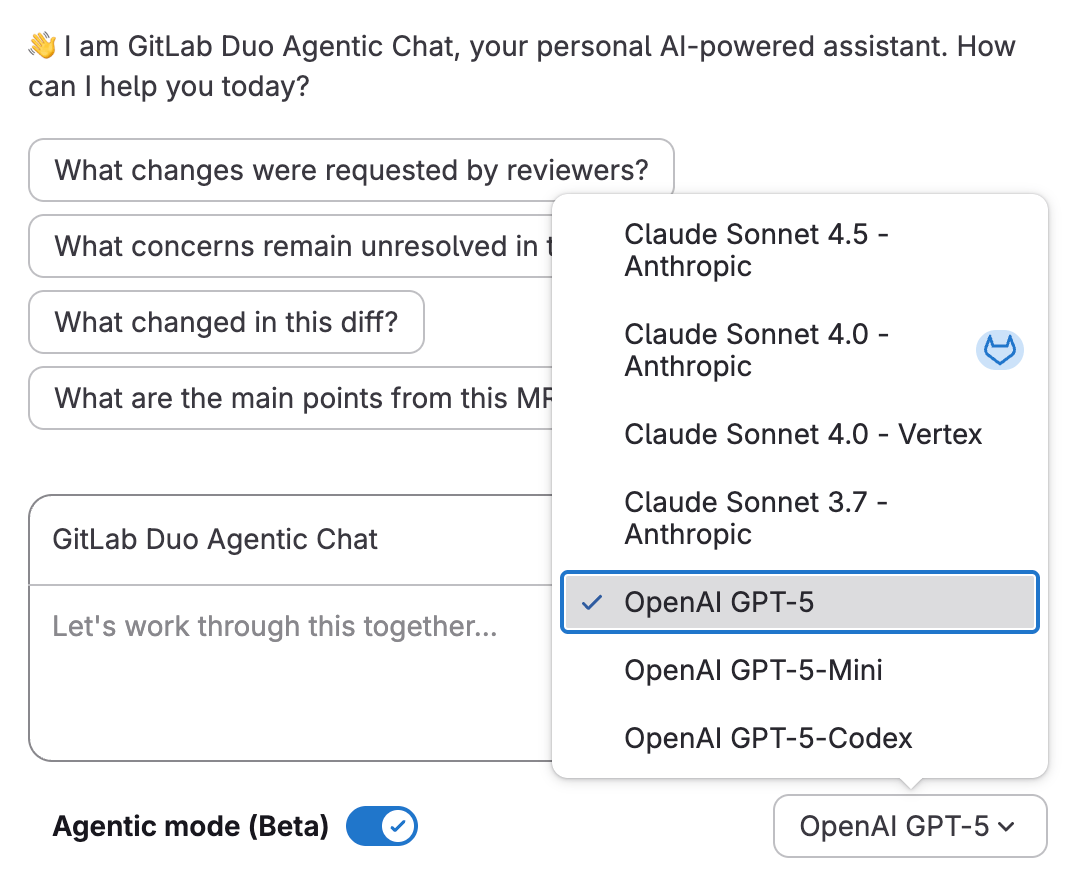
Learn more here.
GitLab Duo Planner, a specialized agent and Product Manager team member (beta) (Premium, Ultimate)
GitLab Duo Planner, a GitLab Duo agent, now allows product managers to collaborate directly within GitLab, streamlining their planning workflow. This new tool acts as a proactive teammate, eliminating the need to manually chase updates, summarize planning data, or prioritize work. Instead, GitLab Duo Planner helps product managers analyze backlogs, automatically apply frameworks such as RICE or MoSCoW, and highlight the tasks that genuinely require their focus, leading to faster and more informed decisions. Learn more here.

GitLab Duo planner.
Improved inactive item management for groups and projects (all users)
The Inactive tab in GitLab has been significantly enhanced to provide a consistent, single location for viewing all inactive items. This includes projects that are archived or pending deletion, as well as groups pending deletion.Key Features and Availability
- Unified View: The tab now consolidates all inactive content, simplifying content management.
- Locations: It is available on the group overview page, and within group and project lists throughout Your work, Explore, and the Admin area.
- Permissions: All users with appropriate permissions can view inactive items. However, only group owners and project owners/maintainers can perform actions on them.
- API Updates: New active parameters have been added to the Projects and Groups REST and GraphQL APIs to support this feature.
Maintaining a GitLab instance is simplified with this update. It provides better control over GitLab resources by making it easier to locate and restore archived or pending-deletion content, significantly reducing the risk of accidental loss of valuable work. Furthermore, the clear separation of active and inactive content leads to a more focused and efficient search experience when navigating groups and projects across all parts of GitLab. Learn more here.

Inactive item management.
Updated navigation experience for groups (all users)
GitLab updated the group overview list to offer a more unified and efficient experience. These improvements deliver a clearer way to manage your groups and projects, offering essential details at a glance:
- Comprehensive Project Insights: Projects now feature immediate visibility into stars, forks, issues, merge requests, and key dates, providing a complete activity snapshot without further clicks.
- Direct Management Actions: You can now edit or delete groups and projects directly from the overview using the actions menu. Inactive items, such as those archived or pending deletion, are easily found in the dedicated "Inactive" tab.
- Consistent User Experience: The updated group overview now mirrors the look and behavior of other group and project listings across GitLab, ensuring a more intuitive and cohesive experience.
These changes are designed to save you time by bringing vital information and management tools to the forefront. Furthermore, this update establishes the foundation for upcoming functionalities like bulk editing and advanced filtering capabilities. Learn more here.
View child task completion in issues (all users)
The enhanced child items widget now offers real-time status tracking for issues, providing an immediate overview of progress. This feature helps you quickly spot any work-in-progress bottlenecks or at-risk items. With this visibility, you can make timely adjustments, ensuring sprint deadlines are not jeopardized. Learn more here
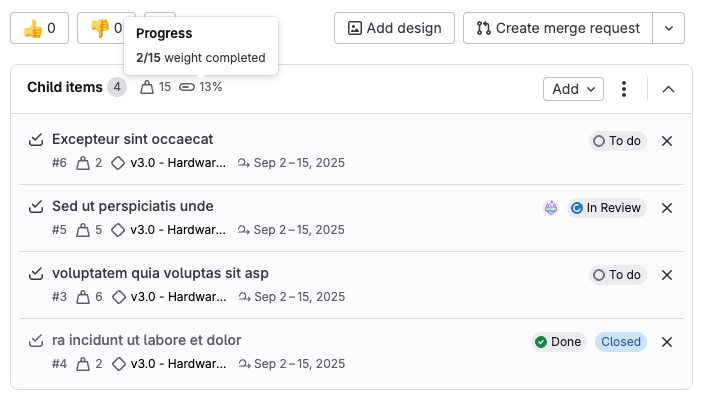
Child items widget now offers real-time status tracking.
Enhanced Admin area groups list (all users)
GitLab enhanced the Admin area groups list for a more streamlined experience for GitLab administrators.
Key improvements include:
- Delayed Deletion Protection: To prevent accidental data loss, group deletions now use the same safe deletion process applied throughout GitLab.
- Faster Interactions: Filtering, sorting, and paginating groups no longer require page reloads, resulting in a more responsive interface.
- Consistent Interface: The groups list now aligns with the look and behavior of other group lists across GitLab.
This update ensures the administrator experience meets GitLab design standards and introduces crucial safety features to protect your data. Future group management enhancements will automatically be reflected across all group lists on the platform. Learn more here.
Pick up where you left off on the new personal homepage (all users)
A redesigned personal homepage is now available, centralizing your crucial GitLab activities for seamless continuity. This new hub aggregates your to-do list, assigned issues, merge requests, review requests, and recently viewed items. This consolidation helps you efficiently navigate GitLab and maintain focus on your most important work. Learn more here.
Redesigned personal homepage.
Increased rule coverage for secret push protection and pipeline secret detection (all users)
GitLab's secret detection in pipelines has been enhanced with the introduction of new rules and updates to existing ones. These changes, implemented in version 7.15.0 of the secrets analyzer, are designed to improve detection quality and minimize false positives. Learn more here.
Variable expansion in environment `deployment_tier` (all users)
We've enhanced CI/CD functionality by enabling the use of CI/CD variables within the environment:deployment_tier field. This new capability streamlines the dynamic configuration of deployment tiers, allowing them to be easily adjusted based on specific pipeline conditions. Learn more here.
Format markdown tables in the plain text editor (all users)
The new Reformat table feature, located in the plain text editor's toolbar, solves this with a single click.
To use it:
- Select the desired markdown table.
- Open the More options menu.
- Select Reformat table.
This feature realigns table columns while preserving alignment settings and indentation, significantly speeding up documentation maintenance and improving collaboration when working with complex tables. Learn more here.
Configure status lifecycles for issues and tasks (Premium, Ultimate)
This release introduces support for configuring distinct status lifecycles, allowing you to define separate workflows for issues and tasks within your projects. Previously, issues and tasks were constrained to share the same set of configured statuses. The new built-in status mapping ensures seamless transition when changing work item types, eliminating the need for bulk editing to align with a new set of statuses. Learn more here.
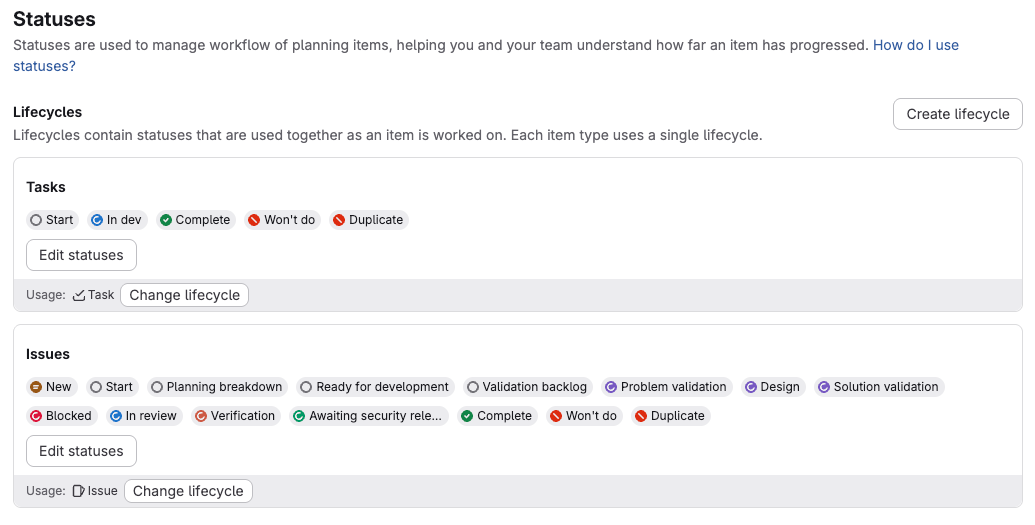
Configuring distinct status lifecycles.
Maven virtual registry now available in beta (Premium, Ultimate)
GitLab 18.5 introduces a significant quality-of-life improvement with a new web-based interface for managing Maven virtual registries. This change moves configuration and maintenance away from specialized API calls, streamlining common platform engineering tasks.
Benefits for Teams:
- Reduced Operational Overhead: Platform engineering teams benefit from a simplified, point-and-click approach for routine operations. Tasks such as clearing stale cache entries, optimizing performance by reordering upstreams, and testing connectivity are now much easier.
- Improved Visibility for Development: Development teams gain better insight into their dependency configurations, fostering more informed discussions regarding security policies and build performance.
Current Beta Status and Limitations:
The Maven virtual registry feature remains in beta, exclusively available to GitLab Premium and Ultimate customers. Current limitations include a restriction of 20 virtual registries per top-level group and a maximum of 20 upstreams per virtual registry.
Advanced SAST diff-based scanning in merge requests
GitLab Advanced SAST now offers diff-based scans for merge requests, focusing analysis only on the code changes. This significantly cuts down scan times compared to scanning the full repository, enabling teams to integrate security testing more efficiently and seamlessly into their development workflow without slowing down the merge request process. Learn more here.
C/C++ support for Advanced SAST
We have added beta support for C/C++ to GitLab Advanced SAST. To use this new cross-file, cross-function scanning support, enable C/C++ support. Learn more here.
Time windows for merge request approval policies
New configuration option for merge request approval policies: time windows for security vulnerability comparisons. This feature provides greater flexibility when the latest baseline security reports are unavailable.
How it works:
- You can now specify a security_report_time_window (in minutes) within your merge request approval policy configuration.
- If the newest baseline security reports are not yet ready, the system will compare the merge request's security results against the most recent available security reports that were created within the specified time window.
Benefit for Development Teams:
This addition helps avoid unnecessary delays in project workflows. In scenarios where baseline security scans are stuck or taking too long (common in busy projects), development teams can configure a time window to allow merge requests that introduce no new vulnerabilities to proceed without waiting for the latest security pipeline to complete. This significantly improves workflow efficiency and speed.
To use this feature:
Edit or create a merge request approval policy and include the security_report_time_window parameter (in minutes) in your configuration.
Learn more here.
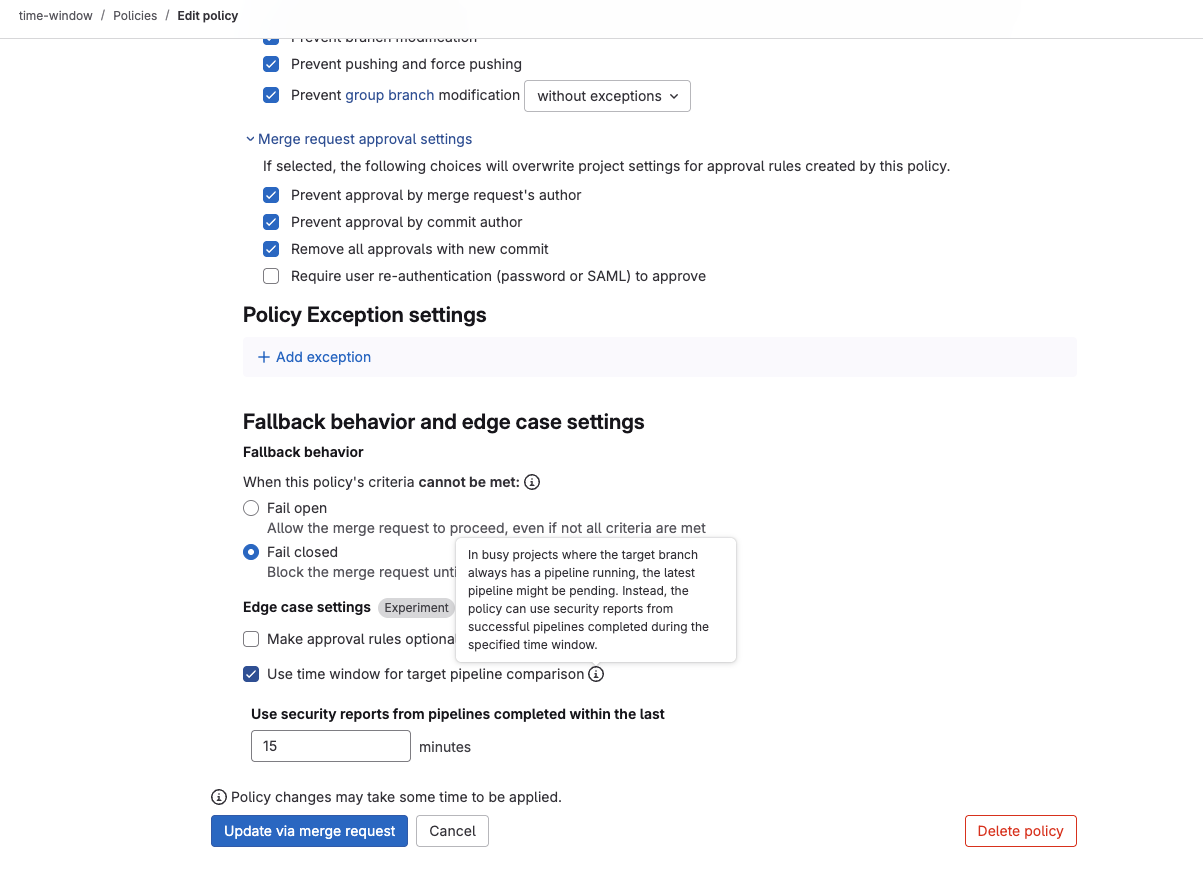
Time windows for merge request approval policies.
Exceptions to bypass merge request approval policies
You can now configure a controlled method for bypassing standard merge request approval policies when critical situations arise, ensuring rapid response while preserving full accountability and audit trails.
Key Features and Capabilities:
- Emergency Bypass with Accountability: Designated users (individuals, groups, roles, or custom roles) can immediately merge or push changes during emergencies such as critical incidents, security hotfixes, or urgent production issues.
- Documented Bypass Process: When invoking a policy bypass, authorized users must provide a detailed justification through an intuitive interface, ensuring every exception is properly documented with context and reasoning.
- Comprehensive Audit Integration: Every bypass action triggers detailed audit events. These events capture the user identity, the policy context, the provided reasoning, and precise timestamps, offering complete visibility for compliance review.
- Flexible Configuration: Policy exception permissions can be defined using either YAML or the UI, supporting a wide range of authorizations including individual users, GitLab groups, standard roles, and custom roles.
- Git-based Push Exceptions: Users with pre-approved exceptions can bypass policies by pushing changes directly while invoking the security_policy.bypass_reason option.
This feature eliminates the need to entirely disable security policies during high-pressure situations, providing a controlled and auditable path for urgent changes while upholding organizational governance and compliance requirements. Learn more here.
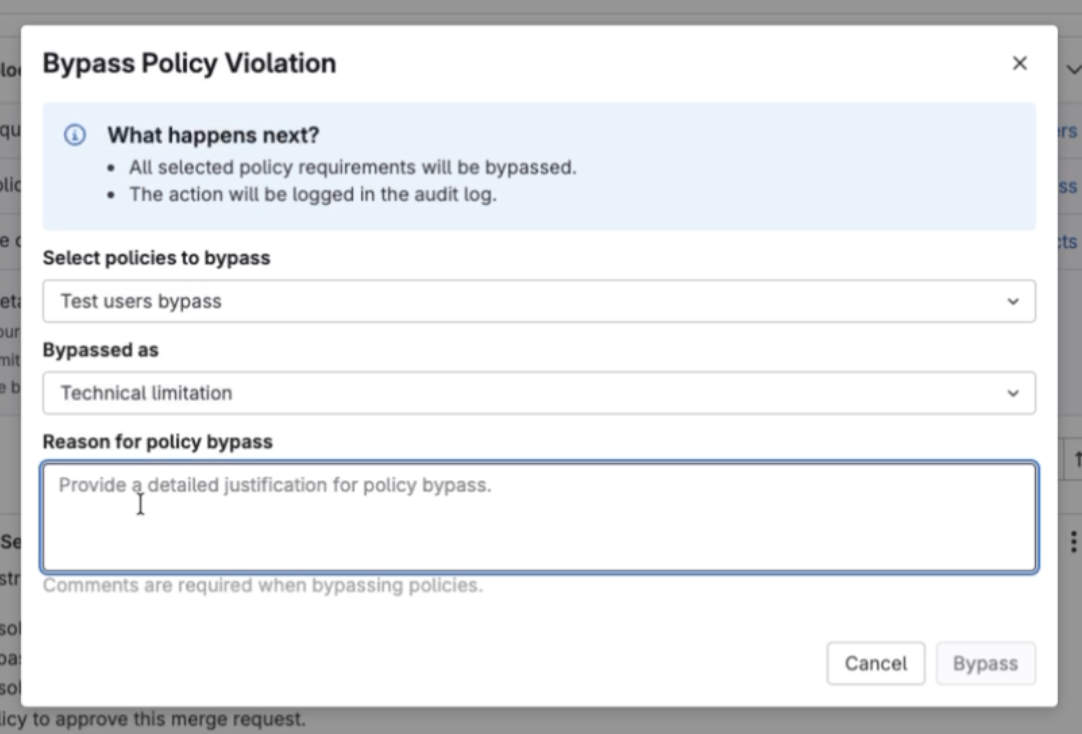
Setting bypassing of the policy violation.
Customizable detection logic for Advanced SAST
GitLab Advanced SAST now allows you to define custom security detection rules. This means you can create rules that specifically align with your organization's unique security needs and coding standards. The feature empowers your security teams to go beyond the default ruleset, identifying and addressing security issues specific to your applications. Learn more here.
Expose original severity from the vulnerabilities API
The GraphQL API for vulnerabilities now includes the original severity level. This enhancement enables users to identify the severity of a vulnerability before any overrides were applied. Learn more here.
New vulnerability management features in GitLab Duo Agentic Chat
GitLab Duo Agentic Chat is an evolution of GitLab Duo Chat, designed for more comprehensive and context-aware interactions. This advanced version can search, retrieve, and synthesize information from across multiple GitLab projects, delivering more relevant and detailed responses. Key initial use cases include project search, file listing and reading, and the ability to autonomously create and modify files based on natural language prompts.
With GitLab 18.5, the capabilities of Agentic Chat are expanded to include managing vulnerabilities reported by security scanners. By integrating vulnerability management tools, Agentic Chat uses AI-powered automation and intelligent analysis to transform traditionally tedious security workflows. Security professionals can now efficiently triage, manage, and remediate vulnerabilities using simple, natural language commands. This significant upgrade eliminates hours of manual navigation through vulnerability dashboards and simplifies complex bulk operations that previously required custom scripts or extensive manual work.
Key Vulnerability Management Features for Ultimate Users with GitLab Duo:
Ultimate users who have the GitLab Duo add-on can leverage these new tools to perform the following actions via GitLab Duo Chat:
- List and View: List all vulnerabilities within a specific project and retrieve detailed information, including CVE data and EPSS scores.
- Status Management: Confirm, dismiss, and revert vulnerability statuses back to 'detected'.
- Severity Adjustment: Update the severity levels of vulnerabilities.
- Issue Integration: Create new issues linked to vulnerabilities or link vulnerabilities to existing issues.
This shift transforms security workflows from reactive, manual triage into intelligent, proactive remediation. Engineers can concentrate on genuine security threats while AI handles repetitive assessment and documentation tasks. Learn more here.
Note: Vulnerability management through GitLab Duo Chat is exclusively available for Ultimate customers with the GitLab Duo add-on.
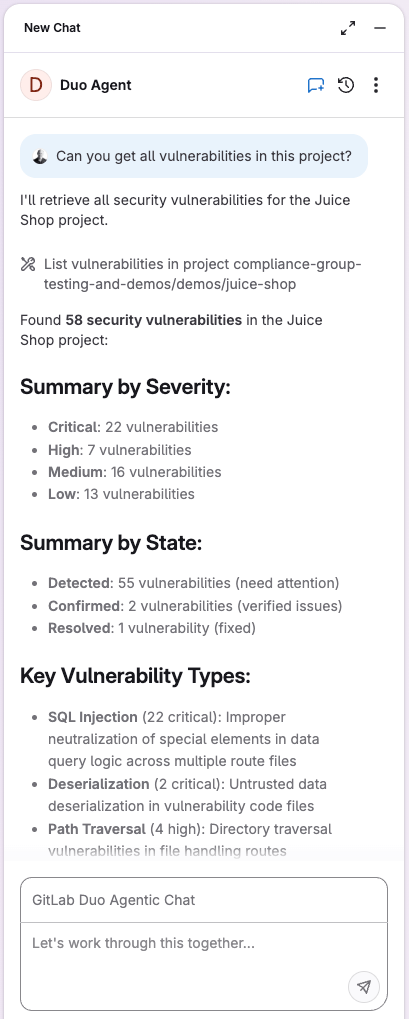
Duo Agent report.
DAST authentication scripts
You can now enhance your CI/CD configurations by incorporating scripts to automate Dynamic Application Security Testing (DAST) authentication workflows. This includes support for complex authentication scenarios, such as those involving time-based, one-time passwords (OTP MFA).
This capability is crucial for maintaining effective security controls and conducting comprehensive, automated security scans. By accurately handling real-world authentication, these scripts streamline the process and ensure precise security assessments of production software. Learn more here.
GitLab Security Analyst Agent for Duo Agent Catalog (beta)
Beta feature within the AI Catalog, the GitLab Security Analyst Agent empowers Ultimate customers with the GitLab Duo add-on to automate and streamline security workflows. This agent can be enabled in specific projects through the GitLab Duo Agentic Chat.
The agent's capabilities include:
- Vulnerability Management:
- Listing all project vulnerabilities.
- Getting detailed vulnerability information (including CVE and EPSS scores).
- Confirming and dismissing vulnerabilities.
- Updating vulnerability severity levels.
- Reverting vulnerability status to detected.
- Creating new vulnerability issues or linking to existing ones.
By handling repetitive assessment and documentation, the GitLab Security Analyst Agent uses AI-powered automation and intelligent analysis to free up engineers, allowing them to concentrate on genuine security threats.
Note on Agents: Agents within the GitLab Duo Agent Platform can perform tasks and answer complex questions. Users can either create custom agents for specific tasks (like creating merge requests or reviewing code) or discover pre-built GitLab agents via the AI Catalog. The GitLab Security Analyst Agent uses GitLab Duo Chat and is exclusively available for Ultimate customers with the GitLab Duo add-on. Learn more here.
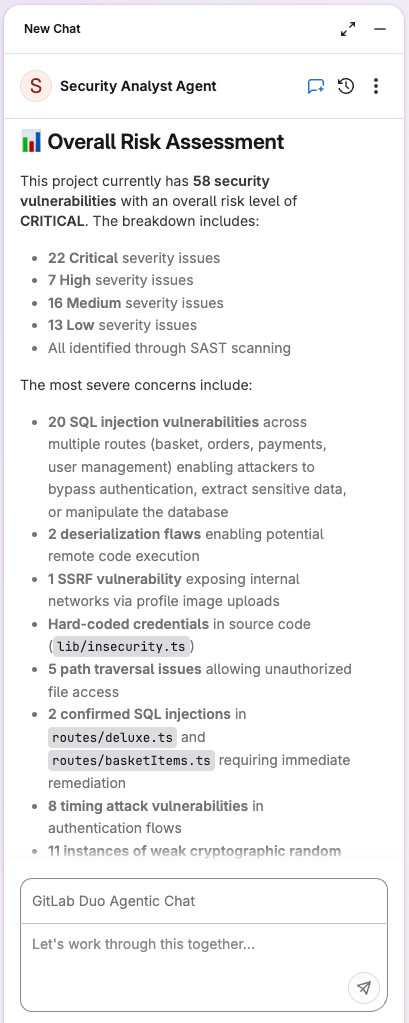
Security Analyst Agent risk analysis.
Instance-wide compliance and security policy management
Compliance and security policy groups for GitLab Self-Managed and Dedicated instances are introduced. This feature centralizes the management of these critical requirements.
Key Benefits:
- Single Source of Truth: A designated top-level group can now serve as the single source of truth for creating, configuring, and editing compliance frameworks and security policies.
- Instance-Wide Enforcement: Security and compliance users within this policy group can apply these frameworks and policies uniformly across all other top-level groups and their associated projects on the instance.
- Simplified Management: This centralized approach significantly streamlines the process of managing and enforcing compliance and security mandates across the entire instance.
Flexibility:
While policy groups facilitate instance-wide standardization, individual top-level groups still maintain the ability to create their own specific compliance frameworks and security policies to address unique project requirements or workflows. Learn more here.
Jenkins
Your automation engine is leveling up to Jenkins 2.528.3. This release prioritizes modernizing the user interface and optimizing underlying performance to keep your day-to-day operations seamless. You will step into a refreshed environment where navigation through headers, side panels, and app bars feels sharper and more intuitive. The refined color palettes and updated button styles create a cleaner visual hierarchy, reducing eye fatigue and helping you spot critical information faster. Additionally, the system responsiveness has been tuned up with additional caching of Java classes, ensuring that interacting with your pipelines is smoother and noticeably more fluid. Jenkins of course didn’t forget about delivering various bug fixes and smaller improvements.
JFrog Artifactory
Your artifact management capabilities are advancing to Artifactory 7.125. This release focuses on deepening integration by introducing native support for the Terraform Provider Registry Protocol and expanding webhook triggers for project-related builds. For you, this translates to a centralized location to proxy and cache Terraform providers, eliminating the need for complex external configurations or workarounds. This native alignment streamlines your infrastructure-as-code deployments while ensuring your underlying repository structures remain robust and efficient. Additionally, the ability to trigger webhooks on specific project builds empowers you to build more intelligent, responsive automation pipelines that react instantly to your team's progress.
A Parent Manifests API has been added, which allows you to discover all parent manifest lists associated with a specific Docker manifest. Learn more here.
Artifactory now supports a build cleanup policy to delete unintended builds. Learn more here.
Two new remote repository types to proxy IDE plugin marketplaces:
- AI Editor Extensions Repository:
- Proxies extension marketplaces for VSCode, Cursor, and Windsurf.
- Integrates with JFrog Curation, allowing for policy-based blocking of unwanted plugins.
- JetBrains Plugins Repository:
- Proxies the JetBrains Marketplace for JetBrains IDEs (e.g., IntelliJ IDEA, PyCharm).
Both repository types enable native browsing and installation of extensions and plugins directly within the respective IDEs.
Availability:
These repositories are available to customers with an Ultimate bundle subscription.
The new Bazel Modules remote repository type in Artifactory is engineered to meet Bazel 9's module dependency management requirements. It now allows for the secure caching and proxying of the Bazel Central Registry (BCR). By maintaining a secure cache and proxy of the BCR, this feature helps streamline the development process and bolster security, as developers are restricted to pulling only approved and vetted dependencies. Learn more here.
Artifactory has been updated to natively support the HashiCorp Terraform Provider Registry Protocol, making it a fully compliant Provider Origin Registry for both Terraform and OpenTofu. This new capability works across local, virtual, and federated repositories and provides benefits beyond the existing network_mirror approach. These enhancements include simplified client configuration, better security through GPG verification, and smarter protocol-aware proxying. Learn more here.
Jfrog optimized Artifactory Worker Events by streamlining sample payloads; legacy fields such as contentLength and trustServerChecksums have been removed from most Copy, Move, and Create events to reduce noise, while the Before Download Request event now includes valuable context like modifiedRepoPath. Replication events have also been updated to accept a repoType parameter.
On the API front, developers gain finer control with new filtering options for the Get All Repository Configurations endpoint—allowing queries by package or repository type—and will notice improved performance when checking Federation Sync States. Please note that Release Bundle v2 endpoints now standardize tag responses to a single tag field for consistency.
Finally, regarding Data Management, the Smart Archiving restore process is safer and now prevents accidental overwrites by skipping artifacts that already exist in the target location. Additionally, Project Admins can now utilize the Archive Search feature, which is automatically scoped to display only packages from their managed projects.
Virtual Repositories for Hugging Face Packages
New Functionality for Hugging Face Repositories:
- Virtual repositories are now supported for Hugging Face packages.
- The Machine Learning Repository Structure is required for any local and remote Hugging Face repositories associated with a virtual repository.
- Important: Resolution of Hugging Face datasets and models from a virtual repository is only possible using the snapshot_download API, not through standard libraries.
For more information, see Create a Hugging Face Repository and Resolve Hugging Face Packages.
NuGet Package Updates
Curation for NuGet Virtual Repositories
JFrog Curation capabilities are extended to include support for NuGet virtual repositories. This offers a powerful, centralized method for securing your consumption of NuGet packages.
Support for .NET CLI with NuGet Packages
NuGet packages now feature full support for the .NET Command-Line Interface (CLI).
Optimized NuGet Versioning
Tighter validation, requiring all NuGet packages to adhere to the strict guidelines of Semantic Versioning (SemVer 2.0). Refer to the specification for details.
Rate Limiting for NuGet Search APIs
A new rate-limiting mechanism has been implemented for search APIs. This prevents excessive calls and maintains service stability.
Upgraded Gradle Set Me Up Wizard
The Gradle Set Me Up wizard has been upgraded to support Gradle 9.
Added Enforcement of Custom Configurations for Certain Remote Docker Repositories
When creating a remote Docker repository for an Azure Container Registry (*.azurecr.io) or a Microsoft Container Registry (https://mcr.microsoft.com/), Artifactory makes the following default configuration:
Disable URL Normalization = true
When creating a remote Docker repository for a Chainguard Registry (http://cgr.dev/chainguard), Artifactory makes the following default configuration:
Block Mismatching Mime Types = true
These default configurations are set upon remote repository creation and can be canceled afterwards. Learn more here.
Npm experience enhancements
Jfrog upgraded the npm workflow to be both more flexible and secure. You can now use the npm search command with up to three distinct search terms when querying local repositories, making it easier to pinpoint specific packages. Additionally, security visibility is expanded with npm Audit now enabled by default on supported remote repositories, complementing the existing support for virtual repositories. Learn more here.
New Setting Added to Complete a List Manifest Image Overwrite
A new setting has been added under Package Settings called Complete list manifest image overwrite. When this setting is enabled, overwriting a list manifest image will asynchronously overwrite all of its sub-manifests.
Release Lifecycle Management
Expanded support for distributing and exporting Release Bundle v2 versions
To make distributing and exporting Release Bundle v2 versions easier, you can now use JFrog Distribution with Release Bundle v2 versions signed with the default key in Artifactory. To support this change, the default key type has been changed from RSA to GPG, and the name of the default key has been changed to default-lifecycle-key. Learn more here.
Improved visibility for nested Release Bundles
The Release Bundle v2 content graph now provides a clear, visual representation of nested Release Bundles. Seeing the complete hierarchy enables you to understand how the Release Bundle is constructed, even when it contains other Release Bundles. Learn more here.
Improved aggregated Release Bundle creation
Artifactory has enhanced its management of aggregated Release Bundles (Release Bundle v2 composed of other Release Bundle versions). When creating a new Release Bundle version, Artifactory will now successfully resolve conflicts if multiple constituent Release Bundles contain the same artifact but with differing metadata (like evidence or properties). In such cases, the newer version of the artifact will be used in the final aggregated bundle.
Change of status code when creating Release Bundle v2 from build with missing artifact
To ensure more accurate reporting, errors that occur during Release Bundle v2 creation due to missing artifacts will now return a 422 (SC_UNPROCESSABLE_ENTITY) status code. This change provides a more accurate representation of the expected behavior when an artifact is not found and avoids triggering unnecessary monitoring alerts that were caused by previous, less specific status codes.
Performance Improvement in Release Bundle v2 Promotion Flow
The performance of the promotion flow for Release Bundle v2 versions has been improved.
Source environment included in Release Bundle v2 promotion GET API results
The Get Release Bundle v2 Promotions and Get Release Bundle v2 Version Promotions REST APIs now include the source environment in their responses. This enables you to see at a glance the name of the environment from which the Release Bundle version was promoted.
Redesigned presentation of Release Bundle v2 contents
The Content tab for Release Bundle v2 versions has been redesigned to show each package and standalone artifact included in the version (known as "releasables") and their source (for example, a build or a different Release Bundle).
Release Bundle v2 versions now associated with stages and lifecycles
This version introduces stages and lifecycles to replace environments, offering users greater flexibility and control over their Software Development Lifecycle (SDLC). Administrators can now define both global and project-specific stages and categorize them under SDLC categories like 'Code' and 'Promote'. These selected stages are then added to a lifecycle, which visually represents the entire progression of a release candidate through the SDLC. Learn more here
Support for webhooks for project-related Release Bundles
You can now configure Artifactory webhooks for specific projects to trigger notifications based on actions on Release Bundle v2 versions. These notifications will be sent when a Release Bundle in the designated project is uploaded, promoted, or deleted.
Important: To set up a Release Bundle webhook for a particular project, you must be working within the context of that project, rather than the "All Projects" scope. Learn more here.
Created-by information provided for Sigstore evidence
To improve understanding and traceability, the API response when creating and deploying Sigstore evidence now includes the username associated with the JFrog token instead of ‘internal’.
More accurate error messages during Release Bundle promotion
To improve user understanding, validation errors during the Release Bundle v2 promotion process will now return a BAD REQUEST error message (HTTP 400) rather than a generic HTTP 500 error.
Release Bundle v2 auto-creation feature removed
The automatic creation feature for Release Bundle v2 has been removed from the platform UI. This feature was originally introduced to assist customers in migrating from the older build promotion method to the more comprehensive capabilities of Release Lifecycle Management, and it has now fulfilled its intended purpose.
Viewing Release Bundles distributed to Edge nodes
To maintain alignment between the platform's UI and the REST API, access to view distributed Release Bundle versions (v1 and v2) within the Received tab on Edge nodes is now restricted to admin users only. Learn more here.
Adding days/weeks selection for Time-based Policy Condition - Cleanup Release Bundle V2
Enhanced RB V2 cleanup functionality with the addition of days/weeks selection for policy condition. You can now configure cleanup conditions, specifying days/weeks for the RB V2. Learn more here.
Improved Artifact Lifecycle Management
Artifactory has been enhanced to update an artifact's creation timestamp to the current date and time when it is copied or moved to a new repository. Previously, the original creation timestamp was retained during these operations. This led to potential inaccuracies regarding the artifact's actual age and relevance in its new location, hindering the effective application of repository cleanup policies and conflicting with industry standards. The "last modified" timestamp remains unchanged to ensure the integrity of the artifact's last update is preserved. For backward compatibility, this feature is implemented behind a feature flag and is disabled by default.
New Metadata Properties Added to the manifest.json
When a new image is pushed or cached, the manifest.json will now automatically include new metadata properties: docker.os and docker.architecture. These properties specify the operating system and the operating system architecture, respectively.
Prevent accidental removal of referenced sub-architectures in multi-arch images
Starting from this Artifactory version, when deleting a multi-architecture image, any sub-architecture variant that is still referenced by another image will be preserved.
Support for Easy Copying of Administration Values
The JFrog Platform WebUI now includes a convenient Copy button in the Administration module pages. This new feature allows you to copy important values with a single click, enhancing usability.
The values that can now be easily copied include:
- Token ID (under Access Tokens)
- Name (under Projects, Users, Groups, Permissions, Project Members, Webhooks, and Manage Integrations)
- Auth URL (under OAuthSSO)
- URL (under Webhooks)
- Group Name (under Crowd/ Jira)
- Provider URL (under Manage Integrations)
- Project Key (under Projects)
Jfrog Xray
Security visibility is becoming sharper and more actionable with the move to Xray 3.131. This release brings your security assessments up to date with modern standards, including the latest industry benchmarks for risk scoring and container management. You now have access to advanced reporting tools that allow you to schedule insights, share findings via dashboards, and deeply scan Helm charts for hidden threats. The addition of CVSS v4.0 scoring ensures your risk assessments are more precise, helping you prioritize the vulnerabilities that truly impact your infrastructure. Simultaneously, the ability to automate and visualize reports eliminates manual tracking, making it easier for your team to stay aligned on security posture.
The Curation workflow is becoming smarter and more versatile with three key updates. First, support has expanded to include Conda, allowing you to apply consistent governance policies to your Conda packages alongside other ecosystems.
Second, Xray introduced curation for VS Code remote repositories (specifically via AI Editor Extensions), meaning you can now enforce policies and block risky extensions from marketplaces just as you would with standard binaries—note that this requires an Ultimate or Unified Security Bundle.
Finally, developers will experience fewer interruptions with Compliant Version Selection for PyPI and NPM; instead of simply blocking a request when a specific version violates policy, Curation now automatically returns the highest compliant version available, keeping builds moving without compromising security.
Added support for a new macro JFrog Research Severity in Native Jira Integration. It uses severity from JFrog Research when available, falls back to CVE data, or applies your default value if neither is found.
Xray now supports scanning multi-architecture images. The results are presented as a unified scan summary for the entire image, along with individual scans for each contained architecture.
Xray has been updated to include support for CVSS v4.0 scoring, supplementing its existing CVSS v3 and v2 capabilities.
This update leverages CVSS v4.0's more detailed, flexible, and accurate framework. Security professionals can now conduct more precise risk assessments, as the new standard better incorporates exploitability, the evolving threat landscape, and specific environmental context.
Xray now supports scanning Helm charts to identify vulnerabilities and license compliance issues within the chart’s packaged dependencies.
Your Software Bill of Materials (SBOM) capabilities are significantly more robust with this release. Xray now fully supports the SPDX standard, allowing you to both ingest SPDX formatted SBOMs and export them in version 2.3.
To improve accuracy during ingestion, Xray added CPE (Common Platform Enumeration) matching for generic components, ensuring better identification of assets. On the compliance side, transparency gets a boost: Apache 2.0 NOTICE information is now included in exports, and Automatic License Conclusions are clearly distinguished—appearing as a dedicated column in PDF reports and as a specific "concluded" property in SPDX and CycloneDX files.
Xray has transformed the reporting workflow for both Violations and Vulnerabilities, offering a powerful, unified experience. You can now utilize a streamlined step-by-step wizard to define the exact scope of your reports—spanning repositories, builds, release bundles, or projects—and set them to run automatically on a daily, weekly, or monthly schedule. Collaboration is built-in with direct email sharing, while new interactive dashboards provide at-a-glance insights via severity breakdowns, applicability filters, and "Top 10" widgets. For deeper analysis, the updated interface offers granular filtering, detailed remediation guidance, and the option to export comprehensive overview PDFs.
The Frogbot integration is now available for your GitHub repositories via the JFrog GitHub App, streamlining its setup process.
For repositories within GitHub Organizations, enabling this integration automatically:
- Configures Frogbot with GitHub Actions.
- Adds necessary secrets.
- Opens a workflow pull request in the selected repository.
Once enabled, Frogbot provides continuous security monitoring by:
- Scanning commits and pull requests for security issues.
- Adding comments with detailed findings.
- Automatically opening fix pull requests for vulnerable dependencies.
SonarQube LTS
Your code quality platform is advancing to SonarQube LTS 2025.4. This release integrates modern defense mechanisms, such as native secrets detection and the automatic identification of AI-generated code, to address the evolving landscape of development risks. For you, this means immediate visibility into potential credential leaks and a clearer understanding of which parts of your codebase were machine-authored. You will be protected against accidentally committing sensitive API keys or tokens, effectively stopping security breaches at the source. Furthermore, specific quality gates for AI code allow you to embrace new coding assistants with confidence, ensuring that auto-generated logic meets the same rigorous safety standards as your manual work. Make sure to check the deprecated section at the end.
Sonar's MISRA Compliance Early Access now includes coverage for over 25 new MISRA C++ 2023 rules. This expansion further strengthens checks for safety-critical systems. This enhanced rule coverage is available in Enterprise Edition and higher. Learn more here.
SonarQube's secrets detection capabilities have been significantly expanded, now recognizing over 400 distinct secret patterns across 346 rules. This update introduces 89 new rules (currently in BETA) that are activated by default to further strengthen your security posture.
Key updates include:
- Default Kotlin Coverage: Passwords and secrets are now detected by default in Kotlin code.
- YAML and JSON Support: Detection of passwords and secrets in YAML and JSON files is now available. This feature can be enabled using the opt-in parameters: sonar.yaml.activate = true and sonar.json.activate = true.
The related quality rule is:
- S6418 - Hard-coded secrets are security-sensitive
The Taint Analysis engine has been significantly expanded to cover JavaScript/TypeScript, Go, and VB.NET, providing deeper security insights across your stack. For JavaScript and TypeScript, a next-generation engine delivers more accurate and actionable findings (activatable via the SAST Engine settings), while the new support for Go tracks untrusted input across functions to catch injection risks. Finally, VB.NET developers now gain full Static Application Security Testing (SAST) capabilities, ensuring legacy and modern .NET applications are equally protected against data flow vulnerabilities.
The addition of SAST for Kotlin, including taint analysis, extends security checks to Kotlin-based projects.
Autodetect AI code for Copilot-generated code is not limited anymore to GitHub projects. Available in the Enterprise edition and above.
You can now choose your own Azure OpenAI LLM as the provider for AI CodeFix. Learn more here.
The AI CodeFix’s rule coverage has been extended across multiple programming languages, ultimately improving code quality and developer productivity with relative ease.
The following rules have been updated to support AI CodeFix:
- C#: S3241
- C++: S125, S995, S5416, S5350, S1238, S1905, S3490, S3659, S1155, S3229, S959, S2259, S6229, S905, S3923, S1768, S1751
- JavaScript / TypeScript: S878, S1874, S125, S3358, S905, S1854, S1481, S6644
- Python: S112, S5754, S1186, S1940, S1854, S6660, S1515, S1110, S5795
Reporting capabilities have been enhanced to provide more granular control and deeper insights at the project level. You can now customize and download Security Report PDFs to align directly with specific industry standards like OWASP Top 10, CWE Top 25, STIG, and CASA (available in Enterprise Edition). Additionally, Regulatory Reports have been upgraded for easier access via the Project Overview page; the PDF version now visualizes the distribution of issues based on insights, while the CSV export has been expanded to include maintainability issues or code smells, depending on your configured quality mode.
The developer experience within the IDE has been expanded to bring critical checks closer to your coding workflow. SonarQube for IDE now supports Software Composition Analysis (SCA), allowing users with an Advanced Security license to view vulnerable dependency results directly within Visual Studio, IntelliJ, and VS Code. Simultaneously, C++ developers gain early access to MISRA C++2023 rules across these IDEs, enabling you to spot and fix compliance issues locally in your C++ files—complete with rule descriptions—before code ever leaves your machine.
The Community plugin for Mercurial SCM is no longer compatible with SonarQube Server.
Removed ProfileExporter and ProfileImporter extension points
Removed two extension points in the plugin-api ProfileExporter and ProfileImporter. The following APIs have been deprecated:
- GET /api/qualityprofiles/exportAPI endpoint. You can now use GET /api/qualityprofiles/backup instead.
- GET /api/qualityprofiles/exporters
- GET /api/qualityprofiles/importers
Web API
Deprecated POST and PATCH parameters now logged into the deprecated log file
Whenever a V2 deprecated POST or PATCH parameter is used, a deprecation message is logged into the deprecated log file indicating what is or will be deprecated and from when. Learn more here.
SonarQube Community Built
Your code analysis toolkit is expanding to SonarQube Community Build 25.11. This release is all about keeping pace with the bleeding edge of development ecosystems by adding support for the very latest programming language standards. You can now seamlessly run quality checks on projects built with PHP 8.5, Python 3.14, Kotlin 2.2, and Go 1.25. This ensures your static analysis remains relevant and effective even as your teams adopt the newest syntax and features, allowing you to innovate without compromising on code quality.
The Java analyzer has been enhanced to fully support Java 24. This includes successfully parsing Java 24 source files without errors, correctly handling all new Java 24 features, and incorporating new Java 24-specific rules. Additionally, existing rules have been updated to properly utilize the new language constructs introduced in Java 24.
SonarQube analysis now supports Kotlin 2.2.
SonarQube introduced a targeted set of rules to harden Python-based AWS Lambdas. The new analysis focuses on Security by flagging hardcoded access keys and insecure S3 operations, and improves Performance by enforcing resource reuse and proper pagination. Additionally, these rules ensure reliability by validating environment configurations, mandating explicit network timeouts, and ensuring proper error handling and temporary file cleanup.
The addition of SAST for Kotlin, including taint analysis, extends security checks to Kotlin-based projects.
A comprehensive set of rules to modernize and clean up Angular TypeScript projects have been introduced. The focus is on Architecture & Best Practices, encouraging the use of standalone components and discouraging legacy metadata properties like inputs and outputs. We also enforce better Lifecycle Management by ensuring classes implement proper interfaces and removing empty methods to reduce clutter. Finally, strict Binding Conventions are now applied to prevent aliasing and naming collisions with standard DOM events, ensuring your component interactions remain predictable and standard-compliant.
SonarQube has introduced a comprehensive set of rules to modernize and clean up Angular TypeScript projects. The analysis focuses on Architecture & Best Practices, encouraging the use of standalone components and discouraging legacy metadata properties like inputs and outputs. It also enforces better Lifecycle Management by ensuring classes implement proper interfaces and removing empty methods to reduce clutter. Finally, strict Binding Conventions are applied to prevent aliasing and naming collisions with standard DOM events, ensuring component interactions remain predictable and standard-compliant.
SonarQube has delivered targeted improvements across several key analyzers. PHP analysis is now more efficient due to optimized keyword parsing that replaces slower regex-based logic, while the Secret Detection engine sees general performance gains. For Rust developers working in restricted or air-gapped environments, the Clippy analysis now supports a dedicated offline mode; by setting sonar.rust.clippy.offline to true, scans can proceed without attempting to fetch external dependencies, provided they are already available locally.
SonarQube has updated its language parsers to support the latest ecosystems. Developers can now seamlessly analyze code written in Go 1.25, PHP 8.5, and Python 3.14, ensuring that projects utilizing the newest syntax and features are fully covered by quality and security checks.
68 rules from the eslint-plugin-unicorn have been added to the JavaScript analysis.
Parallel execution of Python rules is now supported. Learn more here.
SonarQube now stops the analysis when a high-volume file move is detected and raises a warning to let users revert to their initial project configuration in case of an unintended file move.
SonarQube’s integration with GitHub Enterprise Cloud with Data Residency is now supported.
SonarQube Standard
Your primary code quality platform is advancing to SonarQube 2025.5. This release enhances your CI/CD capabilities with native GitHub Actions support and introduces a safety net for issues detected solely due to the platform upgrade. You gain a smoother upgrade experience where new rule violations won't immediately disrupt your established quality gates or fail your builds. This "sandboxing" approach allows you to triage new findings at your own pace without blocking development, while the deeper GitHub integration streamlines your pipeline management.
SonarQube updates sometimes introduce new issues in unchanged code sections due to improvements in Sonar analyzers or changes to built-in quality profiles (e.g., adding rules). These unexpected new issues can cause sudden quality gate and pipeline failures, leading to frustration and release delays.
To mitigate this, you can enable the sandboxing of issues resulting from SonarQube updates that meet preconfigured conditions. Sandboxed issues offer the following benefits:
- They do not affect your quality gate.
- Users can triage these issues at their own pace.
For more information and setup details:
- Understand the feature: See Sandboxing of issues coming from SonarQube update.
- Instance-level setup:
- Via system properties to enable the feature for the current update (see Update notes below for 2025.5).
- In the UI (see Quality standards).
- Project-level setup: See Managing your project's quality gate.
Previously, Software Composition Analysis (SCA) was an instance-level setting in the UI, applying to all projects. The latest version introduces more flexibility: Instance administrators can now not only enable the service but also set a default activation status (on or off) for all projects within that instance. Learn more here.
SonarQube Server now supports analysis of YAML files detected as GitHub Actions. Learn more here.
SonarQube has strengthened its foundational analysis capabilities. Go 1.25 is now fully supported, and PHP parsing has been optimized for speed by replacing legacy regex logic. For Rust developers in air-gapped environments, Clippy analysis now offers a dedicated offline mode (sonar.rust.clippy.offline), allowing scans without external dependency fetching. Additionally, Python analysis now supports parallel rule execution, significantly reducing scan times for large codebases.
The analysis for web technologies has been substantially expanded. JavaScript projects benefit from 68 new rules adopted from the eslint-plugin-unicorn plugin, promoting cleaner and more consistent code. For Angular (TypeScript), a comprehensive new rule set enforces modern best practices:
- Architecture: Encourages standalone architecture and discourages legacy metadata.
- Lifecycle: Ensures proper interface implementation and context usage.
- Bindings: Prevents aliasing and naming collisions with standard DOM events.
Python: Cloud & AI Enhancements The Python engine has received a major update focusing on specific libraries and use cases:
- AWS Lambda: A robust set of rules now hardens serverless functions. These checks enhance Security (verifying S3 ownership, blocking hardcoded secrets), Reliability (enforcing explicit timeouts, proper error handling), and Performance (optimizing resource initialization and pagination).
- PyTorch: New rules ensure efficient Deep Learning development by flagging redundant collection functions, enforcing recommended tensor copying methods, and preventing incompatible super() calls in TorchScript.
Sonatype Nexus Repository
Your repository manager is moving to Sonatype Nexus Repository 3.86. This update focuses on reinforcing system stability and introducing proactive monitoring for your instance's licensing health. You will experience fewer unexpected interruptions and receive timely alerts if your license is ever nearing expiration. This ensures your build pipelines remain continuous by preventing sudden service locks due to administrative oversights, while the accumulated bug fixes deliver a smoother, more reliable daily experience.
Sonatype Nexus Repository now offers OpenID Connect (OIDC) authentication, streamlining Single Sign-On (SSO) integration with identity providers like Azure AD, Okta, and Keycloak.
This feature allows organizations to improve security and centralize user authentication by redirecting login processes to a trusted OpenID Provider. A configured OIDC setup simplifies the login experience for users and provides administrators with enhanced access control through external role mapping. Learn more here.
Sonatype Nexus Repository has introduced new license expiration notifications to help administrators prevent unexpected service disruptions. Key features for Pro License administrators:
- Email Alerts: Administrators can configure Nexus Repository to send email notifications as the Pro license expiration date approaches. The new License Expiry Notification capability allows setting the number of days in advance for alerts and specifying the email recipients.
- Visual Warning in UI: A clear, at-a-glance warning is now integrated into the Status Check system. A new License Check status is displayed in the user interface when the license is nearing its expiration, making license health monitoring easier.
Sonatype Nexus Repository Pro features a new REST API specifically designed for managing SAML-backed user records.
This significant update allows administrators to:
- Pre-provision SAML users before their initial login.
- Assign roles immediately upon user creation.
- Maintain alignment of user roles with group memberships defined in the identity provider (IdP).
By enabling full user lifecycle management via the API, this enhancement delivers:
- Improved automation.
- Simplified role assignments.
- Stronger integration with enterprise identity systems.
Learn more here.
SonarQube has strengthened its foundational analysis capabilities. Go 1.25 is now fully supported, and PHP parsing has been optimized for speed by replacing legacy regex logic. For Rust developers in air-gapped environments, Clippy analysis now offers a dedicated offline mode (sonar.rust.clippy.offline), allowing scans without external dependency fetching. Additionally, Python analysis now supports parallel rule execution, significantly reducing scan times for large codebases.
The analysis for web technologies has been substantially expanded. JavaScript projects benefit from 68 new rules adopted from the eslint-plugin-unicorn plugin, promoting cleaner and more consistent code. For Angular (TypeScript), a comprehensive new rule set enforces modern best practices:
- Architecture: Encourages standalone architecture and discourages legacy metadata.
- Lifecycle: Ensures proper interface implementation and context usage.
- Bindings: Prevents aliasing and naming collisions with standard DOM events.
Python: Cloud & AI Enhancements The Python engine has received a major update focusing on specific libraries and use cases:
- AWS Lambda: A robust set of rules now hardens serverless functions. These checks enhance Security (verifying S3 ownership, blocking hardcoded secrets), Reliability (enforcing explicit timeouts, proper error handling), and Performance (optimizing resource initialization and pagination).
- PyTorch: New rules ensure efficient Deep Learning development by flagging redundant collection functions, enforcing recommended tensor copying methods, and preventing incompatible super() calls in TorchScript.
Dependency Track
Your software bill of materials analysis is being polished with the move to Dependency Track 4.13.6. This maintenance release focuses on resolving underlying issues to ensure the platform behaves exactly as you expect. For you, this means a more stable and predictable environment when tracking your component risks. You can trust your vulnerability data without the distraction of minor glitches or interface hiccups. This reliability allows you to focus purely on remediation rather than troubleshooting the tool itself.
____________________________________________________________________________
That’s all for January! See you in February!
Published: