What’s new in Eficode ROOT: February 2026

February might be the shortest month, but our dev stack is growing faster than a high-speed Kubernetes pod! We’ve officially moved to Kubernetes 1.33, bringing us the stability of native sidecars and the magic of in-place resource resizing—because who actually enjoys restarting a pod just to give it a little more "breathing room"? On the security front, Hashicorp Vault 1.21 has landed with enhanced logging and auditing, while GitLab 18.7 is busy making our lives easier with AI-driven "Data Analyst" agents and smarter CI/CD inputs. Not to be outdone, Bamboo 12.1 LTS and Confluence 9.2.13 (now with freshly polished plugins) are keeping our documentation and deployments smoother than a Valentine’s Day chocolate. It’s a lot of version numbers to juggle, but at least our infrastructure is finally more stable than our caffeine levels!
Important heads up!
As part of our upcoming March maintenance window (MMB), we will be upgrading the Jenkins Java version to Java 21. This update is necessary to ensure continued support and security ahead of the upcoming End of Life (EOL) for older versions.
How this affects you:
- Customer-managed agents: If you manage your own Jenkins agents, please ensure they support Java 21 and make any necessary updates after the March maintenance window.
- Eficode-managed agents: No action is required on your part. Eficode will handle the updates for all agents under our management.
This won't affect your ability to build older distributions of Java (such as 8, 11 or 17), as this change only concerns the default Java of your agents. As such, if you are managing your own agents, you will have to change the default Java version you're using on your agents. After this you can select the other JDK versions from within your jobs.
GitLab
GitLab is leaping forward this February from version 18.5 all the way to 18.7 to bring the latest efficiency tools directly to your workspace. This two-version jump streamlines the development lifecycle by replacing manual workarounds with intelligent, automated logic. You will experience a noticeably more intuitive interface designed specifically to clear the clutter and a revamped compliance status dashboard for instant clarity on project health. The new UI prioritizes your most frequent actions to keep you in the "flow" longer without hunting for menus. Additionally, the introduction of dynamic inputs and smarter job dependencies means your pipelines are now flexible enough to adapt to your code's needs in real-time, saving you precious minutes on every single commit.
Highlight
GitLab replaced the compliance standards adherence dashboard with the compliance status dashboard for more accurate reporting on requirements and controls. Learn more here:
Instance setting to control publishing of components to the CI/CD Catalog (Premium, Ultimate)
For administrators using GitLab Self-Managed and GitLab Dedicated, a new governance feature is now available: the ability to restrict which projects can publish components to the CI/CD Catalog.
This crucial update helps enterprise customers manage and maintain a curated, trustworthy CI/CD component ecosystem. Administrators can now establish a project allowlist, ensuring that only authorized projects can publish components.
By controlling component publishing, organizations can prevent unapproved or low-quality components from cluttering the catalog. This guarantees that all available components adhere to organizational standards and security requirements, addressing a key challenge for enterprises focused on enabling teams to discover and securely reuse approved components. Learn more here.
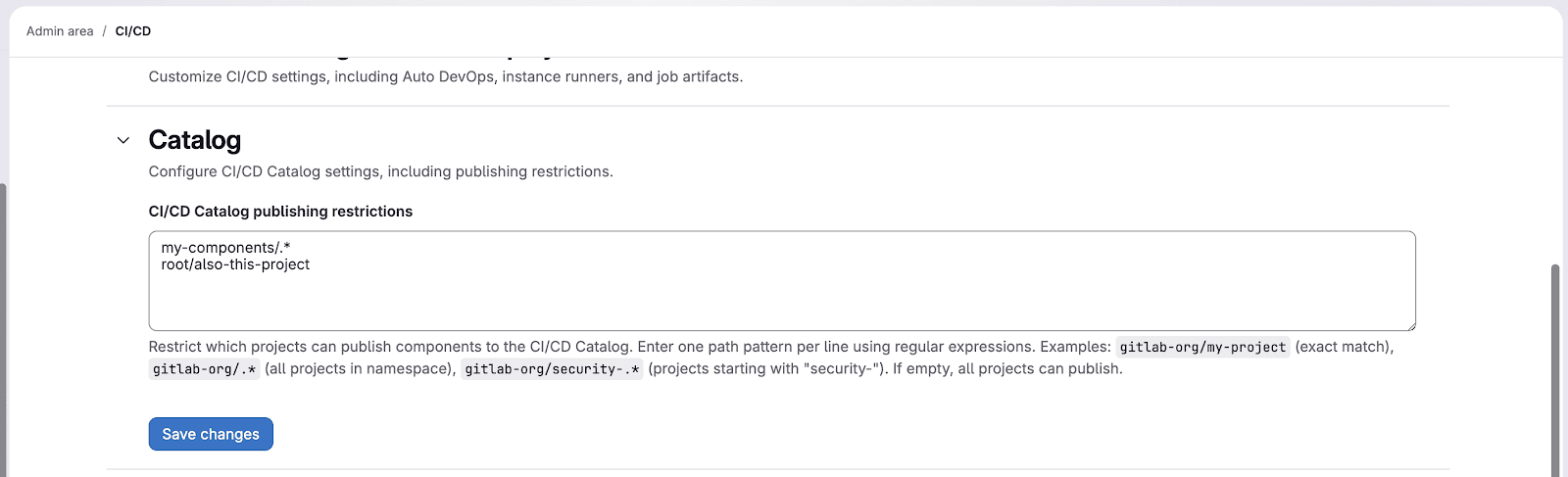
CI/CD catalog publishing restrictions
Rate limit for listing project and group members (all users)
To enhance API stability and ensure equitable resource distribution, we have implemented rate limits for the following endpoints:
- GET /api/v4/projects/:id/members/all
- GET /api/v4/groups/:id/members/all
These endpoints now have a rate limit of 200 requests per minute per user.
This measure is designed to safeguard GitLab instances from excessive API usage that could negatively affect performance for all users. The 200 requests per minute limit is sufficient for typical usage but prevents potential abuse or unintentional resource exhaustion.
Action Required for Integrations:
If your scripts or integrations utilize these endpoints, you must ensure they are configured to handle rate limit responses (HTTP 429). Implement retry logic with appropriate backoff mechanisms as needed. Under normal usage, most users should not experience any impact from this change. Learn more here.
Code Owners now supports inherited group memberships (Premium, Ultimate)
Maintaining high code quality and ensuring proper review of changes, especially to sensitive code, relies heavily on effective code ownership. Previously, organizations with complex group hierarchies faced a challenge: a group had to be directly invited to every project to be referenced in the CODEOWNERS file, even if it already had access via a parent group.
Code Owners now addresses this by recognizing groups with inherited access through parent group membership as eligible approvers when Code Owners approvals are enabled.
Key Benefits:
- Reduced Administrative Overhead: Eliminates the need to invite groups directly to every project.
- Maintained Security and Control: Provides the same level of control over who can approve critical code path changes.
- Seamless Transition: Existing CODEOWNERS files will continue to function without requiring any changes.
This enhancement simplifies the management of code ownership for complex organizations while preserving essential security and approval requirements. Learn more here.
Additional Planner Agent features available in beta (Premium, Ultimate)
The foundational Planner Agent, designed to directly support product managers within GitLab, now includes beta features for creating and editing work items.
The Planner Agent acts as a proactive, intelligent teammate, working alongside you to drive better and more efficient planning decisions. Instead of tedious manual tasks—like chasing updates, summarizing data, or prioritizing work—this agent helps you focus on what truly matters.
Leverage the Planner Agent to:
- Create, edit, and analyze GitLab work items.
- Analyze backlogs quickly.
- Apply planning frameworks such as RICE or MoSCoW.
- Surface critical items that demand your immediate attention.
Learn more here.
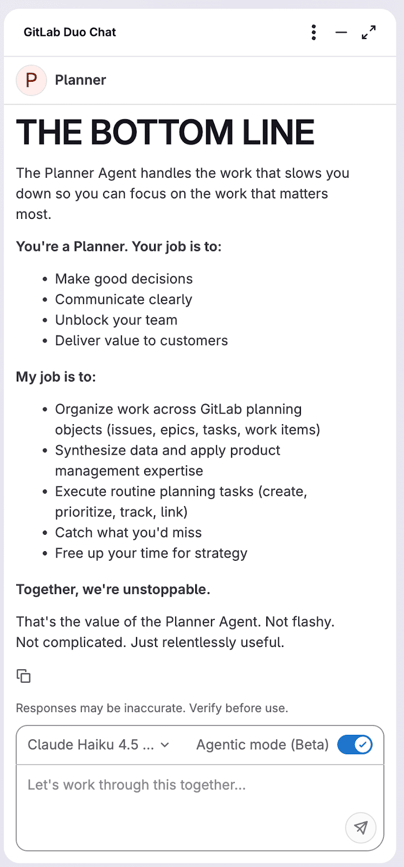
GitLab Duo chat planner agent.
Configure foundational agent availability (Premium, Ultimate)
You now have control over the foundational agents available within your top-level group or instance.
Customize your configuration by toggling all foundational agents on or off by default, or manage individual agents to ensure compliance with your organization's security and governance policies. Learn more here.
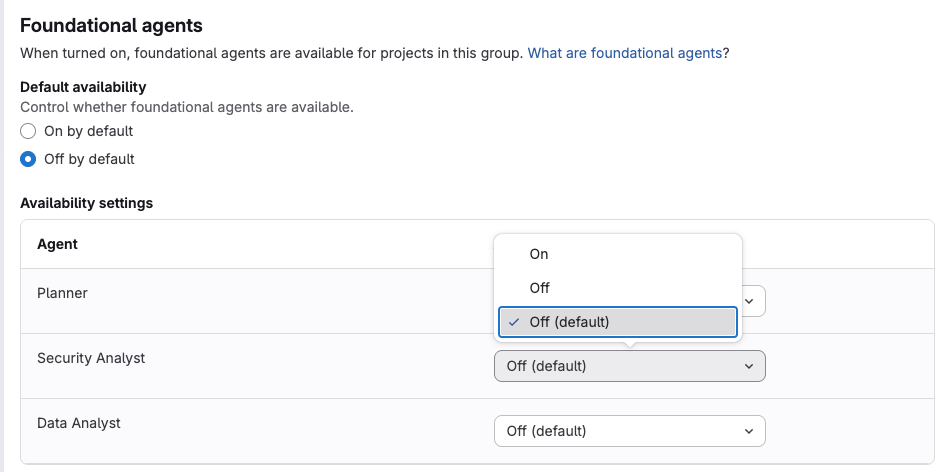
Controls for foundational agents.
AI agent and flow versioning (Premium, Ultimate)
GitLab now ensures the stability and predictability of your AI-powered workflows by pinning any agent or flow enabled from the AI Catalog to its specific version within your project. This allows you to thoroughly test and validate new versions before choosing to upgrade. Learn more here.
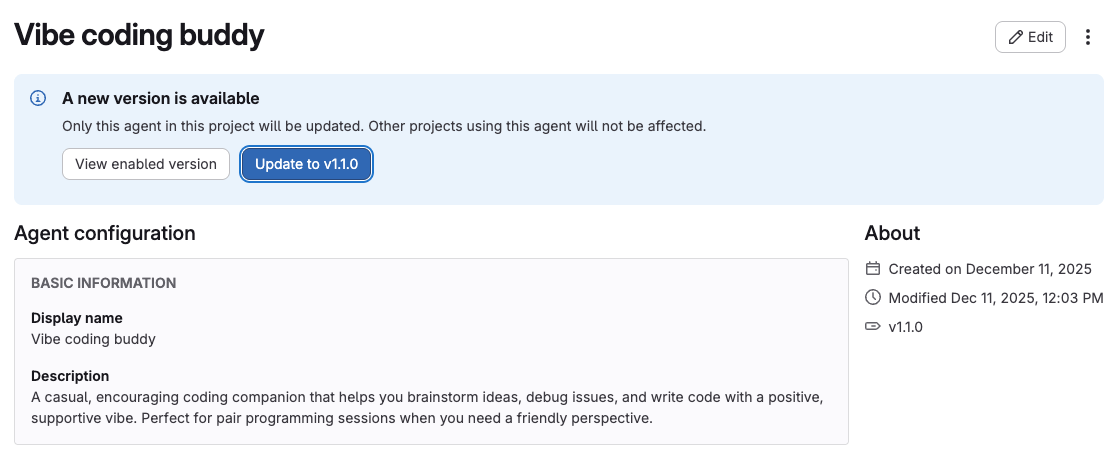
Configuration of vibe codding buddy.
Report agents and flows to administrators (Premium, Ultimate)
GitLab introduced a new feature that allows you to report agents and flows with problematic content directly to instance administrators.
To help maintain the safety and integrity of your agents and flows organization-wide:
- Submit an abuse report detailing your feedback.
- An administrator can then review the report and take appropriate action, such as hiding or deleting the harmful item.
Learn more here.
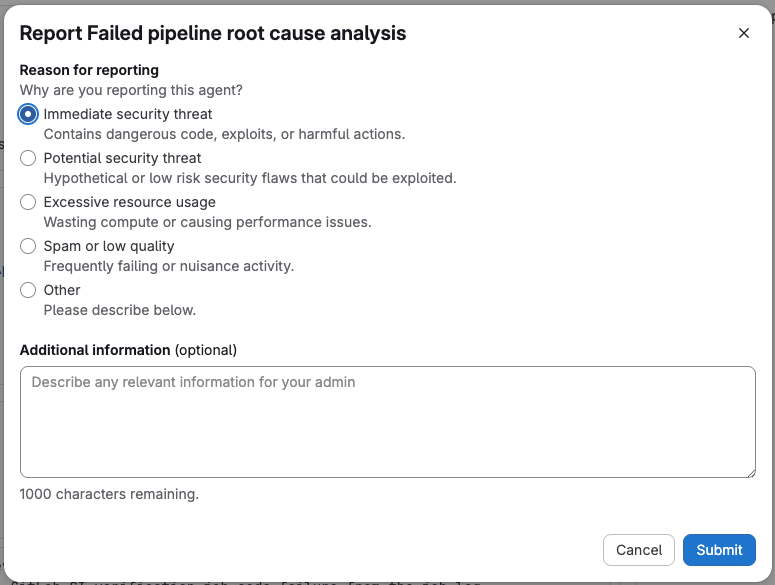
Reporting an agent.
Data Analyst foundational agent powered by GLQL (Beta) (Premium, Ultimate)
The Data Analyst Agent is now available as a specialized AI assistant. It streamlines data analysis across the GitLab platform, using the GitLab Query Language (GLQL) to retrieve and analyze data. The result is clear, actionable insights for your projects, including visualization and data surfacing.
The agent is currently in beta. We encourage you to review the documentation for example prompts and use cases. Your feedback is valuable; please share your thoughts in the dedicated feedback issue to help guide its future development and improvement. Learn more here.
Support for AGENTS.md with GitLab Duo Chat (Agentic) in IDEs (Premium, Ultimate)
GitLab Duo Chat has been enhanced with support for the AGENTS.md specification, an emerging standard for providing essential context and instructions to AI coding assistants.
A key benefit is that, unlike custom rules solely for GitLab Duo, AGENTS.md files are accessible to other compatible AI coding tools. This allows project-specific information—such as build commands, testing instructions, and code style guidelines—to be utilized by any AI tool that adopts this specification.
For convenience, GitLab Duo Chat automatically uses the available instructions from AGENTS.md files in your repository, whether set at the user or workspace level. Furthermore, in monorepos, placing AGENTS.md files within subdirectories enables the delivery of tailored instructions for individual components. Learn more here.
Separate model selection for Agentic Chat and agents (Premium, Ultimate)
You can now select different models for the Agentic Chat feature and for all other agents, a setting that can be applied at the top-level group or instance level. This enhancement expands the available model selection options for the GitLab Duo Agent Platform. Learn more here.
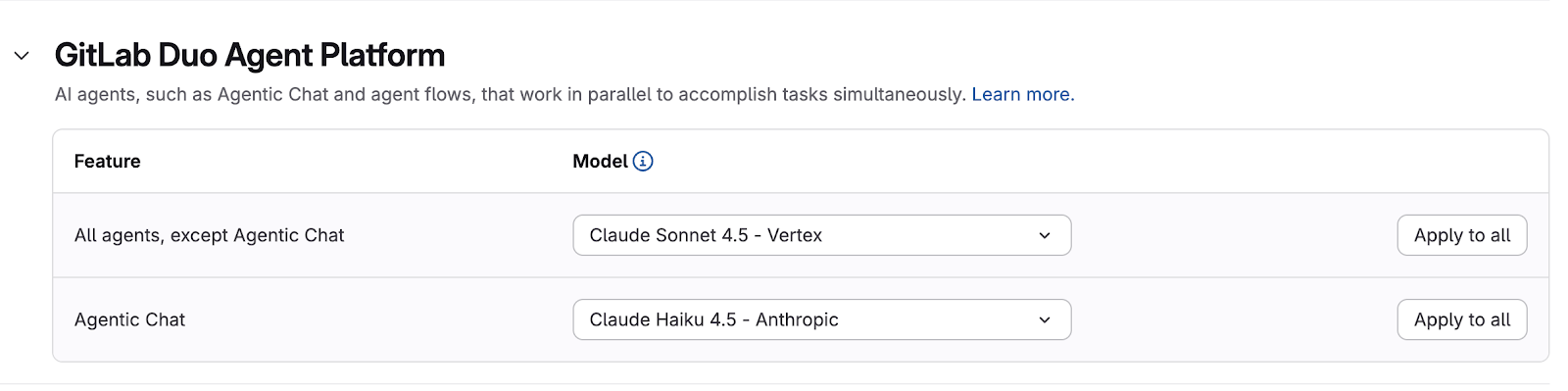
Selection of agents for GitLab platform.
GitLab MCP server available in beta (Premium, Ultimate)
You can now leverage AI assistants such as Claude Code, Cursor, and other MCP-compatible tools to interact with your GitLab projects, issues, merge requests, and pipelines using the new GitLab MCP server, currently in beta. This eliminates the need for building custom integrations for each individual AI tool.
How to Access:
To begin using this feature, ensure that beta and experimental features are enabled within your GitLab Duo settings.
The GitLab MCP server already supports key functionalities across issues, merge requests, and pipelines. Please note that as a beta feature, it may have incomplete functionality or contain bugs, and we are continuously refining it based on your feedback. Learn more here.
Gemini 2.5 Flash model compatible with GitLab Duo Agent Platform for GitLab Duo Self-Hosted (Premium, Ultimate)
You can now use the Gemini 2.5 Flash model on GitLab Duo Agent Platform with GitLab Duo Self-Hosted. Learn more here.
GitLab Duo Planner Agent now available by default (Premium, Ultimate)
The GitLab Duo Planner Agent is now readily accessible in the GitLab Duo Chat's agent dropdown, meaning you no longer need to add it manually from the AI Catalog. This agent now operates at both the group and project levels, leveraging full context from your work items, epics, issues, and tasks.
Start using the Planner Agent with example prompts to streamline complex work breakdown, generate implementation plans, and efficiently structure your team's objectives. Learn more here.
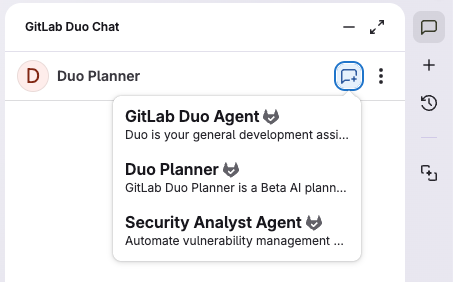
GitLab Duo chat planner.
Advanced search available for both merge request descriptions and comments (Premium, Ultimate)
Advanced search now simultaneously returns matching results from both descriptions and comments across your issues and merge requests. This consolidation eliminates the need to perform separate searches, providing a far more streamlined and comprehensive workflow for finding the exact information you need. Learn more here.
View child pipeline reports in merge requests (all users)
Previously, teams relying on parent-child CI/CD pipelines faced a challenge: checking test results, code quality reports, and infrastructure changes required navigating multiple pipeline pages, interrupting their merge request review workflow.
GitLab now unifies this view. You can access and download all reports—including unit tests, code quality checks, Terraform plans, and custom metrics—directly from the merge request.
This eliminates context switching, significantly accelerating merge request velocity and enabling teams to deliver features faster while maintaining high quality. Learn more here.
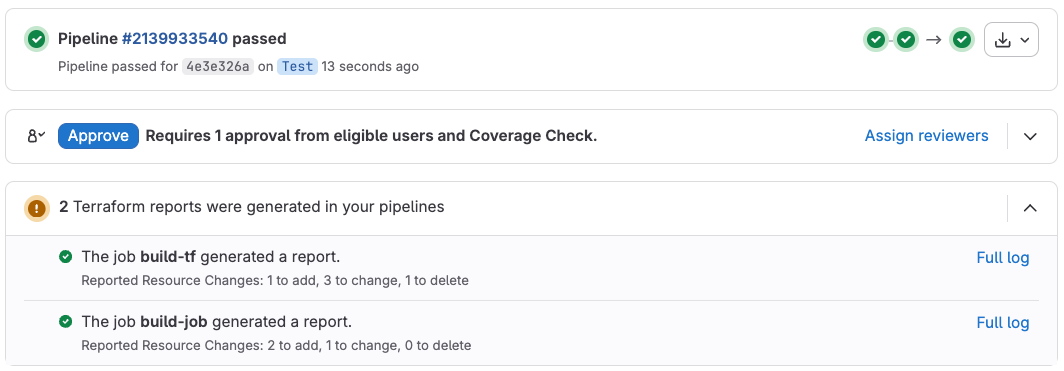
Pipeline reports in merge requests.
Accessibility improvements for heading anchor links (all users)
For improved accessibility and navigation, heading anchor links have been updated. Now, screen reader users will have a better experience as the anchor links announce with the same text as their corresponding headings. Visually, the links appear after the heading text for a cleaner look.
These changes ensure that all users can more easily understand and navigate to specific sections within documentation, issues, and other content. Learn more here.
Toggle draft merge request visibility on your homepage (all users)
To improve focus on actionable work, you now have the option to hide draft merge requests from the Your merge requests section on your homepage.
Previously, there was no way to filter out these draft requests, which could clutter your view and distract from merge requests ready for review or merging.
By using the display preferences to hide draft merge requests:
- The draft requests are excluded from the active merge request count.
- A footer indicates the number of filtered draft merge requests.
- Your preference is saved automatically.
This update helps you concentrate on the merge requests that require your immediate attention. Learn more here.
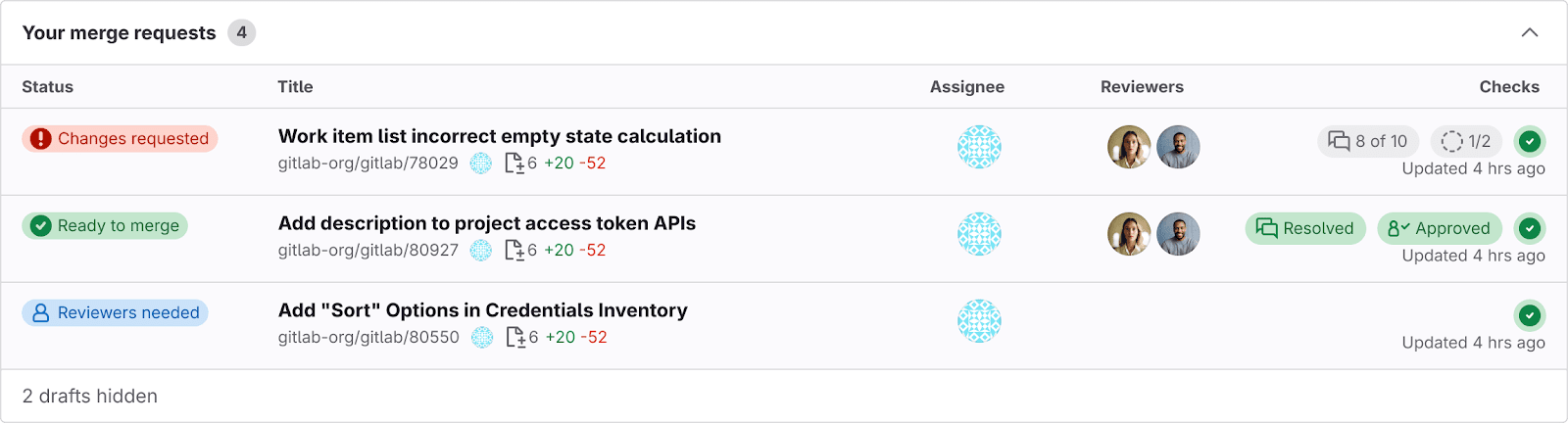
Your merge requests.
Exact code search in limited availability (Premium, Ultimate)
The latest release introduces exact code search, which is now in limited availability. This feature allows users to search for code using exact match and regular expression modes across an entire instance, within a group, or in a specific project. Exact code search leverages the open-source search engine, Zoekt.
Exact code search is enabled by default on GitLab.com. However, for GitLab Self-Managed instances, an administrator needs to install Zoekt before enabling the exact code search feature. Learn more here.
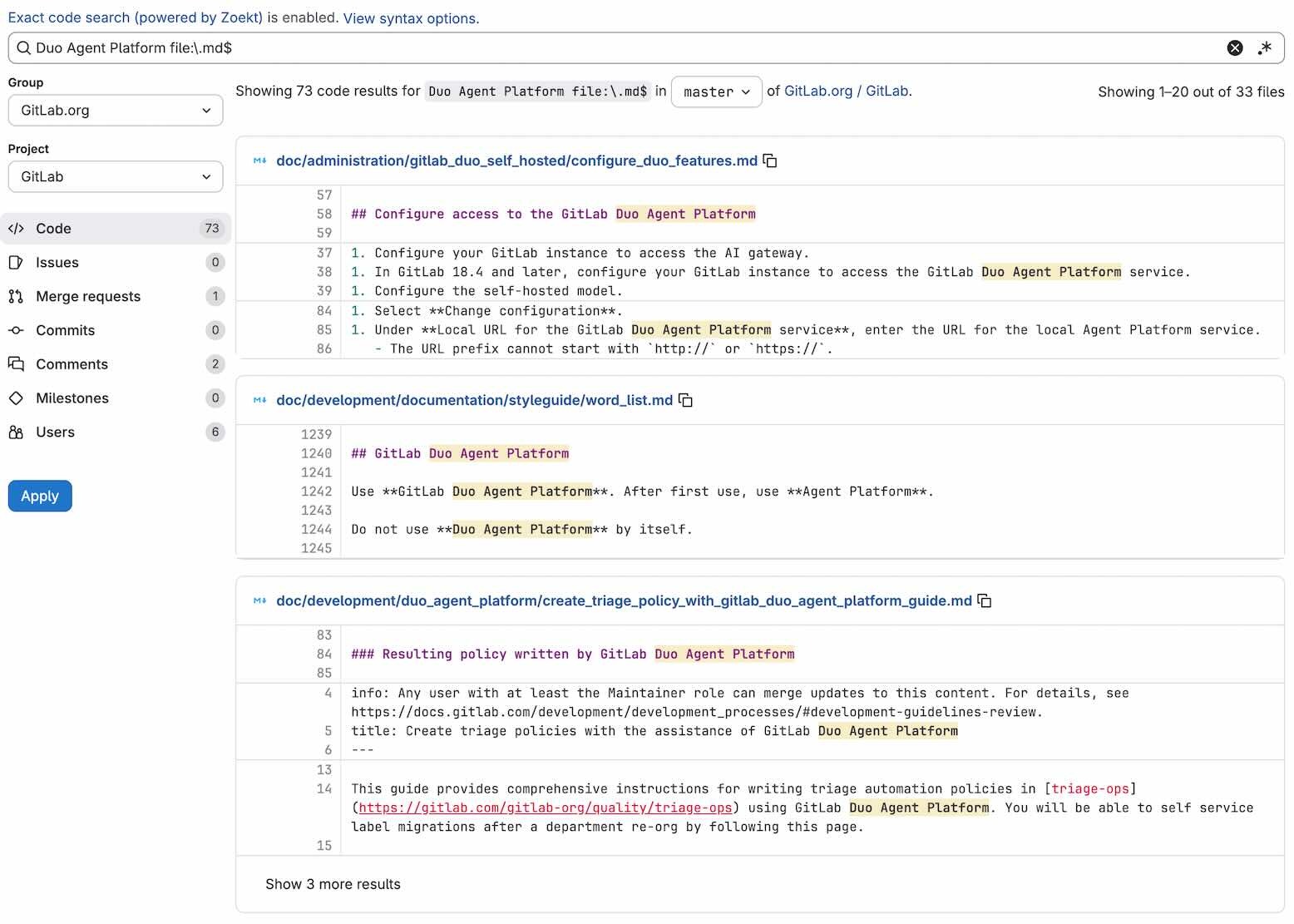
Exact code search search results.
The new GitLab UI: Designed for productivity (all users)
Experience a more intuitive and smarter GitLab User Interface (UI), designed to maximize developer productivity.
The updated side-by-side layout enhances your workflow by utilizing contextual panels, significantly cutting down on clicks and boosting team speed. Benefit from a cleaner, more dynamic experience that adapts to your workflow, allows for workspace customization, and optimizes screen real estate. Learn more here.
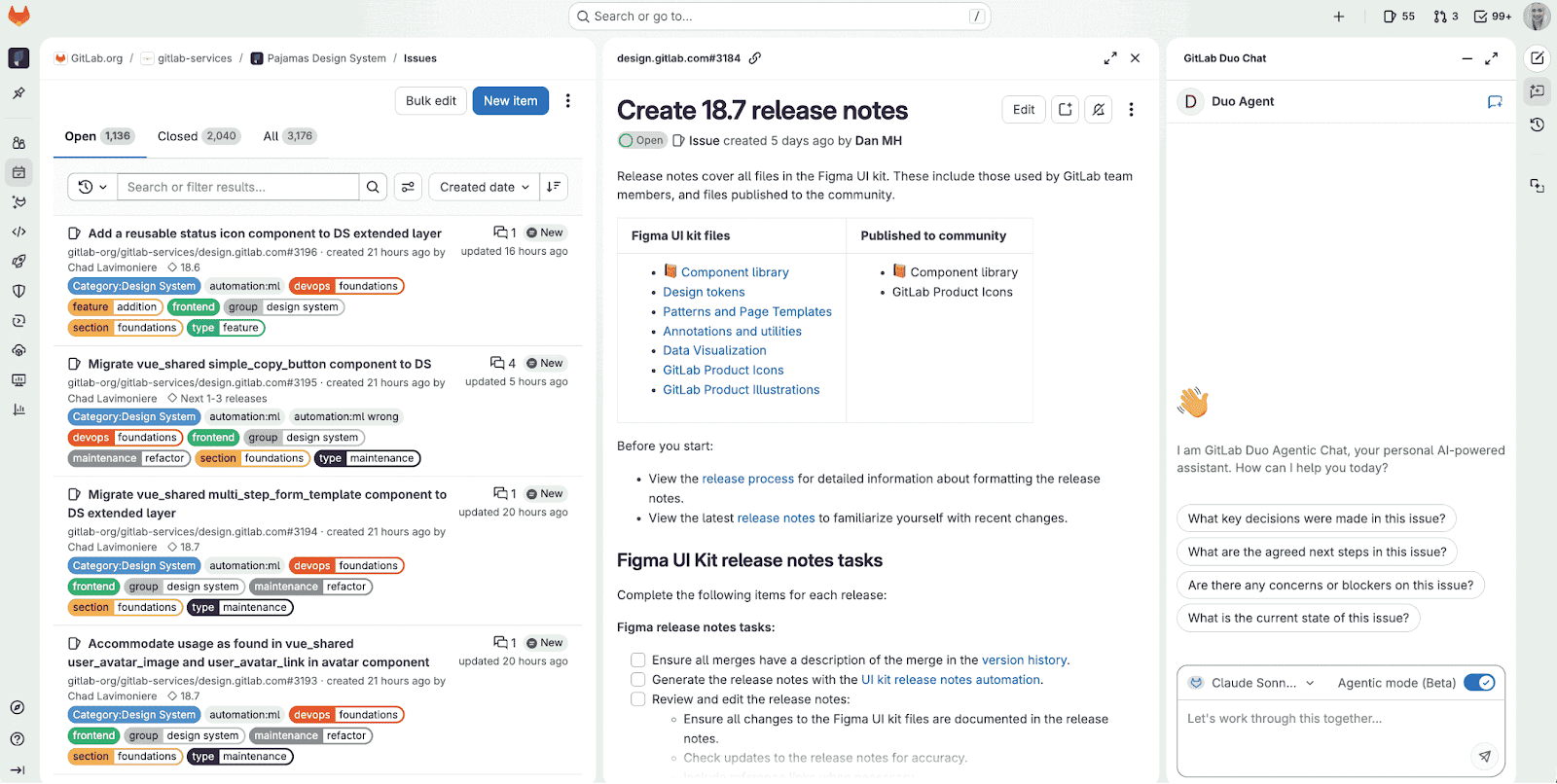
New GitLab UI.
Dynamic input options in CI/CD pipelines (all users)
GitLab introduced dynamic input selection for creating CI/CD pipelines through the intuitive web interface. This new capability allows you to configure your pipelines with dynamic input options that automatically update based on previous selections, providing a superior user experience.
Key Benefits of Dynamic Inputs:
- Intelligent Configuration: Create more context-aware input configurations that guide users through the pipeline creation process.
- Error Reduction:
- Trigger pipelines using pre-configured inputs, minimizing manual errors.
- Ensure that only valid combinations of inputs are selected.
- Streamlined Deployments: Simplify the process for users to select non-default inputs from dropdown menus.
- Cascading Dropdowns: Implement cascading dropdown lists where the options in subsequent lists dynamically populate and update based on earlier selections (e.g., selecting an item in one dropdown populates a list of related options in the next).
Improved GitLab Duo and SDLC trends dashboard (Premium, Ultimate)
The updated GitLab Duo and SDLC trends dashboard now offers superior analytics, focusing on measuring the impact of GitLab Duo on software delivery. This dashboard now supports six-month trend analysis for:
- GitLab Duo feature adoption.
- Pipeline performance.
- Key development metrics like deployment frequency and mean time to merge.
Deeper Insights into GitLab Duo Usage
Teams can now gain a deeper understanding of continuous value provided by GitLab Duo through enhanced user-level metrics. Specifically, you can:
- Track code generation volumes and IDE/language trends for GitLab Duo Code Suggestions.
- Monitor team adoption of new GitLab Duo Agent Platform flows.
Improved Data Access and Performance
Instance administrators have a new endpoint available for extracting all Duo data at the instance level. This data can be retrieved from either Postgres (with a 3-month retention) or ClickHouse.
- The dashboard leverages the ClickHouse integration to achieve sub-second query performance even across millions of data points.
- For self-managed instances, users will find improved recommendations and configuration guidance for integrating with ClickHouse.
Learn more here.
New GitLab CLI features and improvements (all users)
The GitLab CLI (glab) provides new features and improvements to enhance your GitLab workflow from the command line:
- Enhanced authentication: Auto-detect GitLab URLs from git remotes during login, making it easier to authenticate against the correct GitLab instance.
- Flexible pipeline monitoring: View any pipeline by ID with the ci-view command.
- GPG key management: Manage GPG keys directly from the CLI with new commands.
- Project member management: Add, remove, and update project members from the command line.
- Improved Git integration: Enhanced git-credential plugin with support for all token types.
- Modern user interface: Updated prompt library for better confirmation dialogs and consistent GitLab theme across UI components.
Learn more here.
Helm chart registry: No more 1,000 chart limit (all users)
GitLab introduces an important architectural change that removes the 1,000 chart limitation and boosts performance. We achieved this by pre-computing metadata responses and storing them in object storage. This means metadata is generated once in background jobs instead of on every request, resulting in unlimited chart access and quicker loading times. Learn more here.
Webhook notifications for merge request review re-requests (all users)
Previously, webhook consumers lacked the ability to identify which specific reviewer was being re-requested when automation was triggered by a merge request reviewer re-request event. This limitation made it difficult to initiate targeted notifications or customized automated workflows.
GitLab enhanced merge request webhook payloads to include a re_requested attribute within the reviewer data. This attribute provides clarity by:
- Setting true for the specific reviewer who was re-requested.
- Setting false for all other reviewers.
This crucial addition allows for more precise automation surrounding the merge request review cycle. Webhook consumers can now accurately identify the re-requested party, enabling them to:
- Send highly targeted notifications.
- Update external tracking systems with greater accuracy.
- Trigger specific workflows appropriate for the re-requested review.
Learn more here.
Increased rule coverage for secret push protection and pipeline secret detection (all users)
Support for 40 new rules to GitLab’s pipeline secret detection was added. Some existing rules have also been updated to improve quality and reduce false positives. These changes are released in version 7.20.1 of the secrets analyzer. Learn more here.
Webhook triggers for system-initiated approval resets (Premium, Ultimate)
Previously, external systems integrated with GitLab via webhooks struggled to differentiate between manual user actions and system-initiated events, particularly when merge request approvals were automatically reset (e.g., when new commits were pushed with "Reset approvals on push" enabled). This lack of distinction hindered the development of precise automated workflows.
GitLab has now enhanced its webhook payloads to address this. When approvals are automatically reset, the webhook payload includes two new fields to clearly identify the system-initiated event:
- system: Set to true.
- system_action: Provides the specific context for the reset, such as approvals_reset_on_push or code_owner_approvals_reset_on_push.
This improvement allows external systems to build more sophisticated automation workflows that can respond differently and appropriately to manual approval changes versus automatic, context-specific system resets. Learn more here.
Support dynamic job dependencies in needs:parallel:matrix (all users)
The parallel:matrix feature allows users to easily execute multiple jobs concurrently with varying requirements, such as testing code across different platforms simultaneously. Previously, configuring subsequent jobs to selectively depend on specific parallel jobs using needs:parallel:matrix was complicated and lacked flexibility.
Introducing the new [[matrix.VARIABLE]] expression, currently in Beta, addresses this by enabling dynamic one-to-one dependencies. This significantly simplifies the management of complex parallel:matrix configurations. The result is faster pipelines, improved artifact handling efficiency, better scalability, and cleaner overall configuration. This feature is especially beneficial for multi-platform build processes, Terraform deployments across diverse environments, and any workflow that involves parallel processing across multiple dimensions. Learn more here.
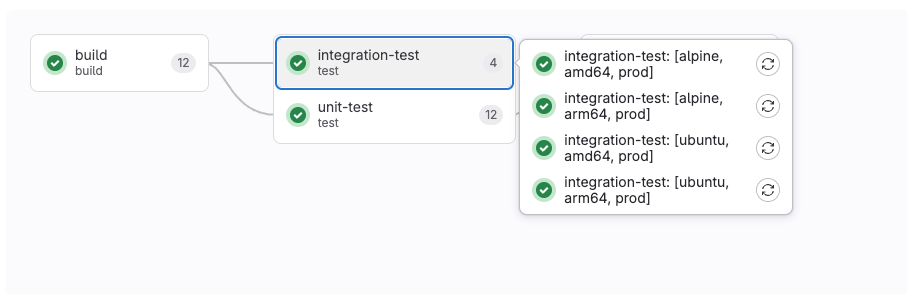
Dynamic job dependencies.
CI/CD Components can reference their own metadata (all users)
GitLab introduced a key enhancement in this release to streamline version management for CI/CD components.
Now:
- You can access the component's context using the new spec:component keyword.
- This allows you to automatically build and publish versioned resources (like Docker images) in sync with the component's release.
- The result is the elimination of manual version management, ensuring synchronization, and preventing version mismatches.
Learn more here.
New security dashboards enabled by default
The security dashboards have been modernized and updated, bringing enhanced security visibility. These dashboards, previously exclusive to GitLab.com, are now enabled by default for both GitLab Dedicated and GitLab Self-Managed environments.
Key enhancements include:
- Vulnerabilities Over Time Chart: This new chart offers improved analysis with features such as:
- Filtering by project or report type.
- Grouping by severity and report type.
- Direct links to individual vulnerabilities within the vulnerability report.
- Risk Score Module: A new module that uses a proprietary GitLab algorithm to calculate and provide an estimated risk score for any given group or project.
Note: ElasticSearch is a prerequisite for utilizing these updated dashboards.
Learn more here.
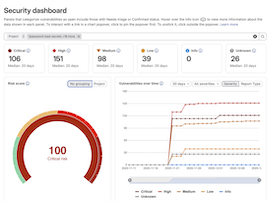
New security dashboards.
SAST False Positive Detection with AI (Beta)
GitLab 18.7 introduces a significant enhancement to security workflows: AI-powered False Positive Detection for Static Application Security Testing (SAST) vulnerabilities. This feature, available as a free beta for Ultimate customers (and requiring activation in group or project settings), is designed to help security teams prioritize genuine threats by automatically assessing the likelihood that a critical or high-severity SAST finding is a false positive.
How it Works:
- Automatic Analysis: False Positive Detection runs automatically after every security scan, eliminating the need for manual initiation.
- Targeted Focus: The analysis is scoped exclusively to Critical and High severity vulnerabilities to maximize the improvement in signal-to-noise ratio.
- Immediate Context: The AI assessment, powered by GitLab Duo, is displayed directly within the vulnerability report, providing security engineers with immediate, actionable context for faster and more confident triage decisions.
- Contextual Reasoning: Each assessment includes an explanation detailing why the finding is or is not likely a true positive, referencing the specific code context and vulnerability characteristics.
- On-Demand Review: Users retain the option to manually trigger the false positive detection for individual vulnerabilities directly from the vulnerability details page.
- Seamless Integration: Results are surfaced alongside existing vulnerability metadata (severity, status, remediation) within the standard vulnerability report.
Learn more here.
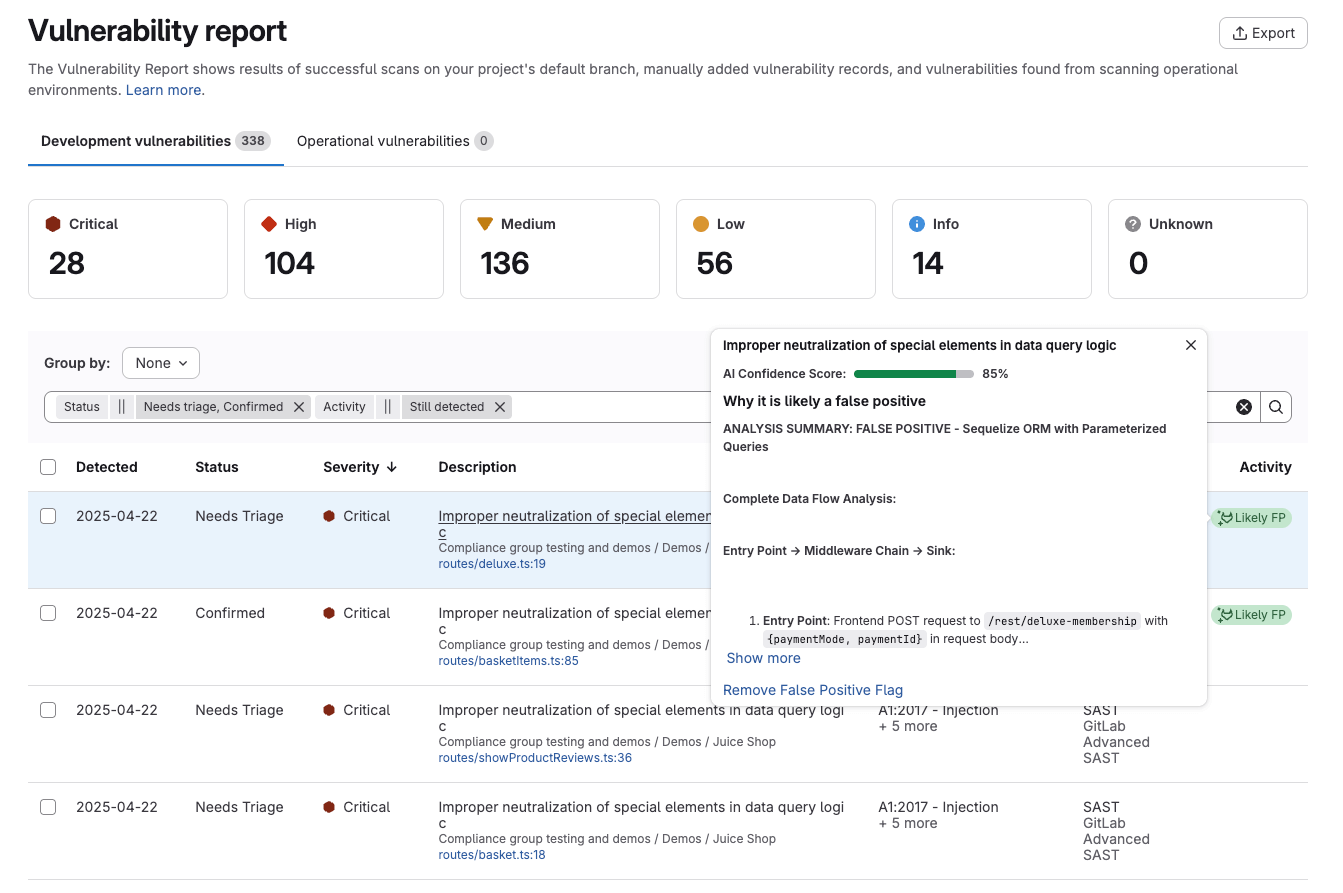
Vulnerability report with AI-powered SAST.
Advanced vulnerability management available in Self-Managed and Dedicated environments
For all Ultimate customers, Advanced Vulnerability Management is now available with the following enhancements to vulnerability reporting for projects and groups:
- Improved Filtering:
- Filter reports by a specific vulnerability identifier.
- Filter reports based on the reachability value.
- Filter reports by the reason for a policy violation bypass.
- OWASP 2021 Categorization: Group data within the vulnerability report using the latest OWASP 2021 categories.
Learn more here.
Filter and comment on compliance violations
The Compliance Violations Report now functions as a dynamic collaboration platform, providing a central location for discovering, analyzing, and resolving all compliance violations across your organization's projects and groups.
Key enhancements include:
- Centralized View and Comprehensive Detail: The report offers a complete overview of control violations, including related audit events, allowing teams to effectively track the status of each violation.
- Powerful Filtering: Quickly pinpoint critical issues with new filtering options by Status, Project, and Control.
- Direct In-Record Collaboration: Teams can now work directly within the violation record itself to resolve issues. This functionality allows you to:
- Tag relevant team members for immediate investigation.
- Discuss and determine remediation strategies.
- Document all findings and resolution steps in one place.
These features significantly boost efficiency, transforming the report into an integrated tool for managing compliance. Learn more here.
Warn mode in merge request approval policies
Security teams can now implement policies with a 'warn mode' option, allowing them to test and validate the impact of new security policies before enforcing them. This provides a soft-gate approach to accelerate security programs and minimize friction for developers during policy rollouts, while still ensuring identified vulnerabilities are addressed.
When creating or editing a merge request approval policy, users can now select between two enforcement options: warn or enforce.
Policies in warn mode will generate informative bot comments on merge requests without blocking them. Optional approvers can be designated to serve as a point of contact for policy-related questions. This transparent, gradual adoption helps security teams gauge a policy's impact and build trust with developers.
Merge requests clearly indicate whether a policy is operating in warn or enforce mode. Audit events track policy violations and dismissals for compliance reporting. Developers have the option to bypass scan finding and license policy violations by providing a mandatory reasoning for the dismissal, fostering a collaborative feedback loop between development and security teams for more effective policy enablement.
For policy violations detected on a project's default branch, the policies will identify the violating vulnerabilities in both project and group vulnerability reports. The project dependency list also now displays badges indicating license compliance policy violations.
Furthermore, an API is available to query a filtered list of policy violations specifically on a project's default branch. Learn more here.
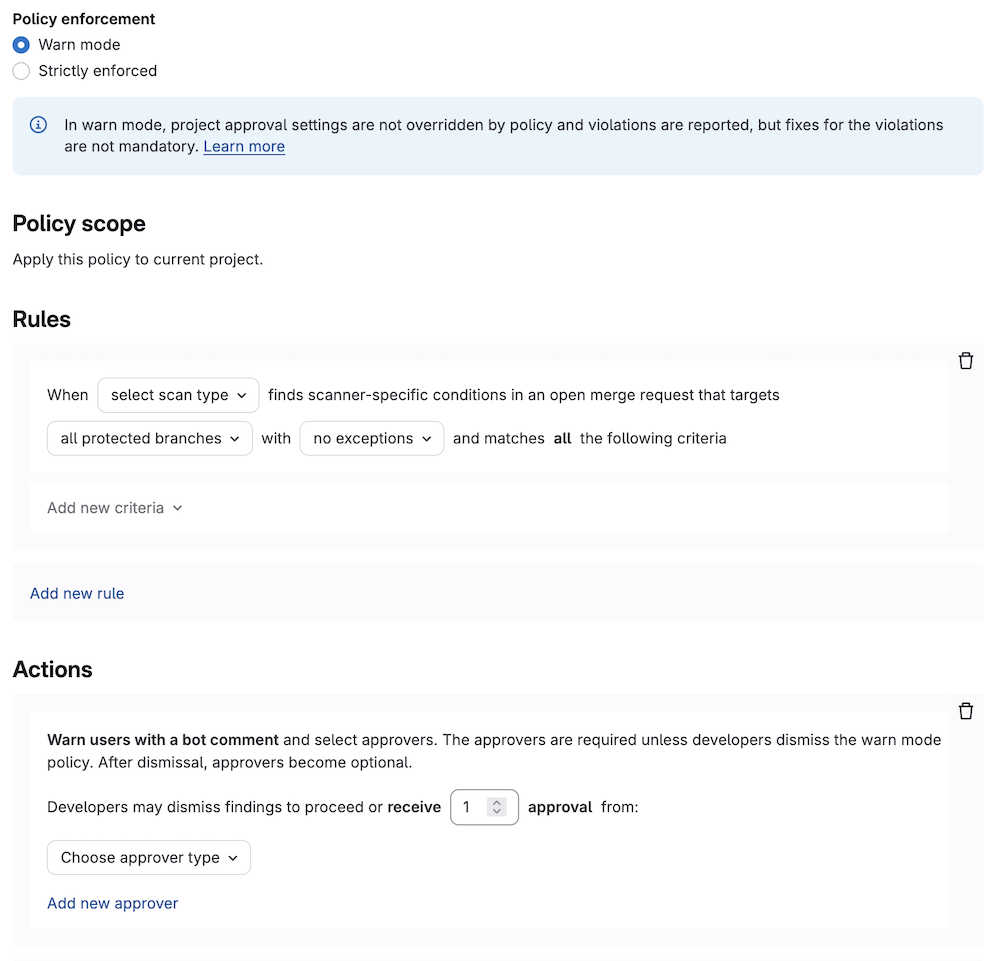
Setting policies.
Compliance framework controls show accurate scan status
GitLab compliance controls, which are configured within compliance frameworks, serve as checks on the configuration and behavior of assigned projects.
Previously, controls related to security scanners (e.g., SAST enablement) required a successful pipeline run on the default branch before the compliance center could display the control's success or failure status.
With the release of GitLab 18.7, this requirement has been removed. The success or failure of scanner-related controls is now determined solely by the completion of the security scan, regardless of the pipeline's overall status. This update clarifies the compliance status, as it now accurately reflects whether security scans have successfully run and finished, rather than being dependent on the entire pipeline passing. Learn more here.
Secret validity checks improved and generally available
To help you quickly address urgent security threats, GitLab 18.7 introduces Generally Available validity checks for leaked secrets.
When a valid secret is exposed in a repository, fast action is essential. These validity checks automatically verify if the leaked credentials are still usable, allowing you to prioritize the most critical findings.
Key improvements in this release include:
- Expanded Vendor Integrations: We now integrate with Google Cloud, AWS, and Postman, building on existing support for GitLab tokens.
- Enhanced Report Filtering: The Vulnerability Report can now be filtered by validity status (active, inactive, possibly active), streamlining the triage and prioritization of secret findings.
- Group-level API: Roll out validity checks across all projects within a group efficiently using a single API call.
Exceptions to bypass merge request approval policies
Organizations now have the ability to designate specific users, groups, or roles that are authorized to bypass merge request approval policies in critical situations. This new capability offers the necessary flexibility for emergency responses while simultaneously ensuring strict accountability, comprehensive audit trails, and robust governance.
Designated personnel can now bypass standard approval requirements when facing critical incidents, security hotfixes, or urgent production issues. This allows authorized users to immediately merge or push changes. Crucially, the system captures a detailed justification and complete audit information for every bypass, ensuring compliance review and full accountability.
Key Features:
- Mandatory Documentation: Authorized users must provide detailed reasoning for invoking a policy bypass via an intuitive modal interface. This ensures every exception is properly documented with context.
- Comprehensive Audit Trail: Every bypass action automatically generates detailed audit events, including the user's identity, the policy context, the provided reasoning, and precise timestamps. This provides complete visibility into exception usage patterns.
- Flexible Configuration: Policy exception permissions can be defined through YAML or a UI. Configuration supports individual users, GitLab groups, standard roles, and custom roles.
- Controlled Git Push Exceptions: Users with pre-approved policy exception rights can push directly by invoking the security_policy.bypass_reason push option.
This feature provides a controlled path for making urgent changes, eliminating the need to completely disable security policies during emergencies and thereby preserving organizational governance and audit requirements. Learn more here.
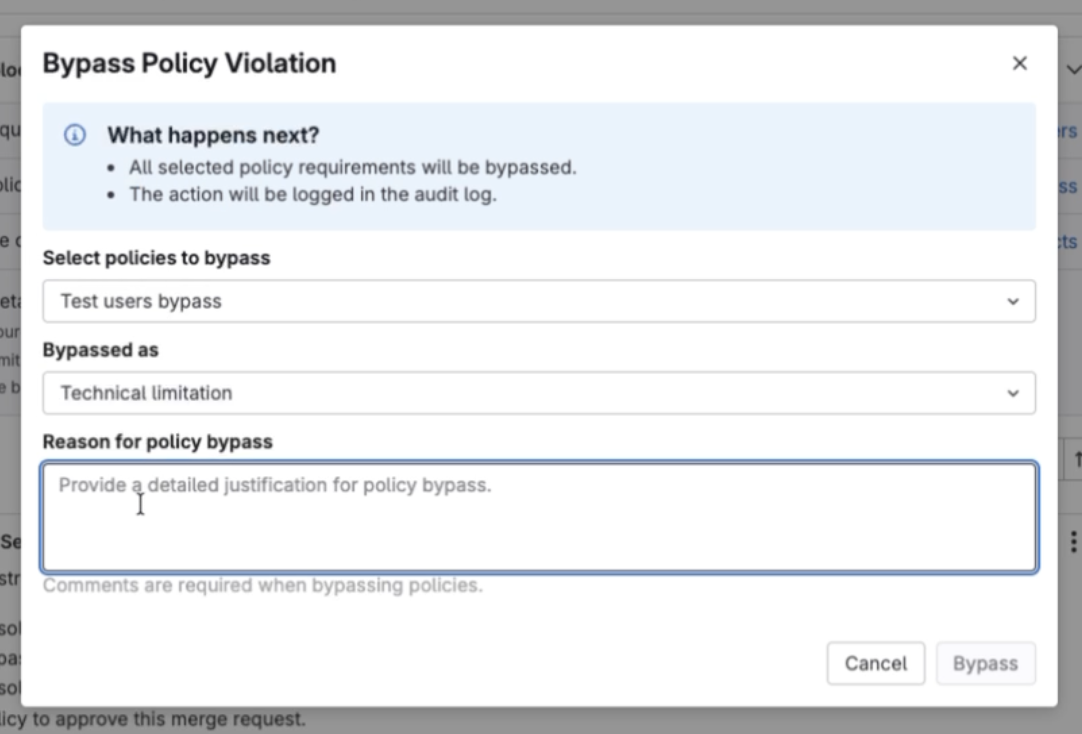
Bypass policy violation setting.
Security attributes (Beta)
Security teams can now enrich project information by utilizing Security Attributes to apply business context.
These attributes are categorized to provide valuable organizational information:
- Pre-defined categories include:
- Business Impact (with structured selections)
- Application
- Business Unit
- Internet Exposure
- Location
- Customization is available to create your own attribute categories and define specific labels within them.
By consistently applying these attributes across your security projects, you gain powerful new ways to quickly search, filter, and prioritize actions within your security inventory based on both risk posture and organizational relevance.
This enhancement allows you to:
- Identify mission-critical projects that require improved scan coverage.
- Review current scan coverage by specific application or business unit.
- Search and filter your project inventory using the applied attributes.
- Quickly locate projects that support publicly accessible or exposed applications.
Learn more here.
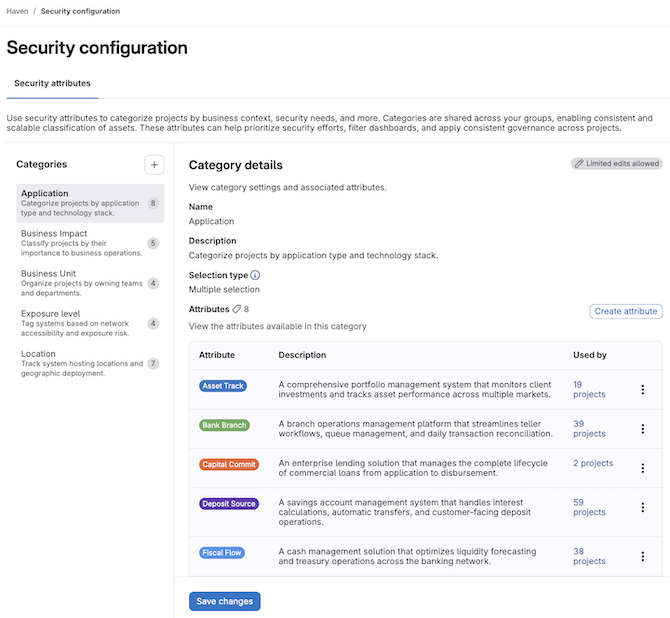
Leveraging security attributes.
GitLab Security Analyst Agent available as a foundational agent
The GitLab Security Analyst Agent has been promoted to a foundational agent within GitLab Duo Agentic Chat. This means it is now available by default for both GitLab Self-Managed and GitLab Dedicated users, eliminating the need for manual addition from the AI Catalog. This specialized AI assistant is designed to streamline vulnerability management and security analysis, offering help with investigating findings, triaging vulnerabilities, and navigating compliance requirements with zero setup. Learn more here.
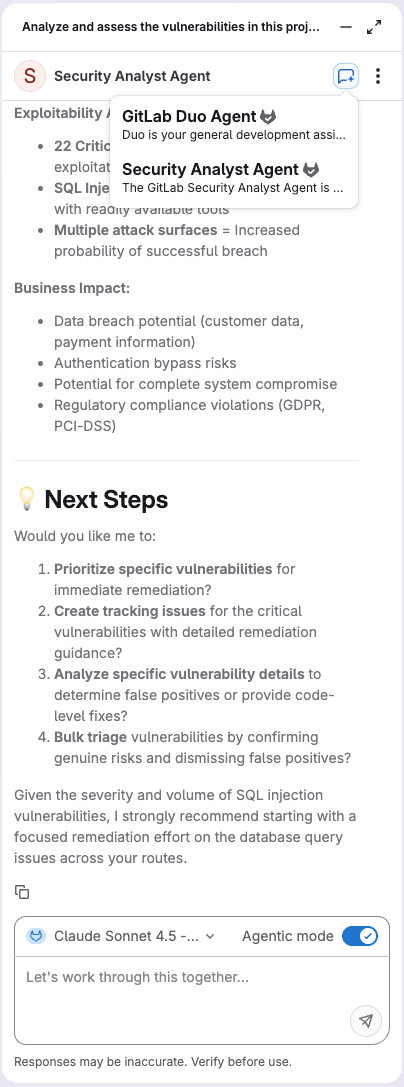
Security Analyst Agent now available.
Published: